
The short answer
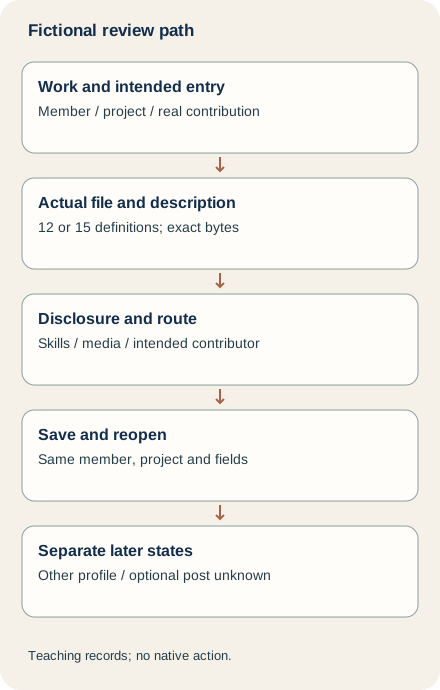
Choose one real project and describe your actual contribution before adding it to the intended personal profile’s Projects section. Check the media, dates, associated organization and skills, then review any contributor notification deliberately. Reopen the exact saved entry. Adding someone as a contributor, their choice to add a shared project and an optional feed post are separate actions and need separate evidence.
What you’ll take away
- A Projects entry, an Experience position and a Featured sample serve different purposes.
- New projects use Add media and Add a link rather than the old Project URL field.
- Contributor notification does not prove that another person added the project.
Choose the project and your part in it
Start with a specific piece of work that a profile visitor should understand: the problem, what you contributed, the output and its limits. Record the intended member and project privately. A team result does not make every contributor its lead, and an association with an organization does not create an employment relationship. Use Experience for an actual professional position and Featured for a selected work sample; neither is a substitute for checking this project entry.
Constructed description: “I documented the definitions in a practice reporting worksheet and prepared a source note for each. The attached teaching file contains 12 definitions. This was a local exercise; adoption, reader understanding and business outcomes were not measured.” When the file changes to 15 definitions, review the description and evidence together. Merely changing the quantity in a draft does not establish that a saved profile changed.
Prepare the actual description, period and supporting item
Keep the short description beside the source you may actually show. Name your contribution with ordinary verbs such as drafted, checked or coordinated. A source that supports reviewed two fields does not support led the whole reporting program. If the source is confidential, narrow the description or prepare a genuinely permitted demonstration; attaching a private working document is not the default way to make the claim more credible.
Keep the known start and end months at their original precision. Do not invent a day or use today as the project’s end merely because the form is open. Select the actual associated institution or organization, not a familiar namesake. The German project help awkwardly says Jahresende in its date row; the English row and both forms’ described month/year fields support an end month and year, not a claim that every project ends in December.
Use the current media route and inspect its contents
LinkedIn’s section and media help says newly added projects have no Project URL field. Use Add media, then Add a link for a destination. Check the actual destination and disclosure before saving; a thumbnail or familiar filename does not establish that the intended version is reachable. Our downloadable text drafts are drafting records, not supported native upload formats.
The profile-media help lists PDF, PPT/PPTX, DOC/DOCX, JPEG, PNG and GIF, with GIF represented by its first frame rather than animation. It lists 100 MB, 300 pages, one million words and a 120-megapixel image ceiling, and says documents cannot be uploaded from mobile devices. The mobile Projects task still offers Add media: that does not override the document-upload restriction. Use a supported actual route and inspect its offered controls; we did not test a limit boundary, Office rendering or a native upload.
Review skills and contributors as deliberate profile changes
The project task offers up to five skills used in the work and says they also appear in Skills. Choose supported labels and inspect that resulting section separately. A selected skill is neither a certification nor a transferred endorsement history. Do not fill every available slot merely to make the entry look complete.
For contributors, match the actual person and contribution before selecting a connection from suggestions. LinkedIn says the contributor name appears only for a connection and that the person receives a notification. Treat that disclosure intentionally. Our exercise holds an unagreed credit or uncertain identity as a planning safeguard; it does not claim a native approval lock or send a test notification. A familiar name, a connection and permission to publish a client artifact are different facts.
Save the intended entry and keep shared-project choices separate
The desktop project task starts with Me, View profile, Add section and Add project. Mobile starts at the profile, Add section, Recommended and Add projects. Read the actual account’s wording, complete the reviewed fields and use Save only for the intended change. Then reopen the project and inspect its description, period, media and selected skills. A submitted save, another project’s visible entry or an old exported profile is insufficient readback.
If you receive a shared-project notification, the separate task says to open that notification, review and update the project fields, then choose Save to add it to your own profile. Review your actual role rather than inheriting someone else’s account of the work. The sender’s tag does not establish your saved entry. Start a post is a separate optional step in both tasks: neither a saved project nor a notification proves that a feed post was published, a message read or every language version synchronized.
Work through twelve different project outcomes
P1 retains a supplied saved 12-definition entry. P2 changes the actual DOCX to 15 definitions but retains the review of the old bytes: hold the stale review. P3 supplies a readback from another member. P4 attempts linked contributor credit for a non-connection. P5 supplies the intended contributor notification but leaves that person’s own project entry unknown. These are different completion boundaries, not five ways to say that the project was approved.
P6 supplies an incoming project that overstates contributor as lead. P7 supplies only a shared-project notification with no saved entry. P8 tries to upload a document through mobile; keep the documented restriction. P9 has a submitted save with no reopened project. P10 supplies one matching entry while a separate feed post remains unobserved. P11 supplies a different media destination. P12 changes the supported end month. Resolve each discrepancy before claiming completion; these records are fictional, not real profile operations.
Use the actual files and a private project record
The local exercise includes four actual teaching DOCX packages with 12 or 15 definition rows, four plain-text descriptions, independent facts/plans/observations, twelve project cases, complete bilingual decisions and blank records. It also contains six separate comment-control cases for the existing guide. Extract with existing Python 3 and run python3 check.py. The standard-library rebuild inspects the actual package XML and checks exact references, quantities, reviewed bytes and supplied observations; it authenticates neither work nor a person.
Keep real member and contributor references, exact project, permitted source, contribution, period, selected skills, intended disclosure, save readback and separate shared-project/post states in your private record. English and German primary bodies were read separately on 2 November 2026. No account, profile, course, connection, notification, upload or publication was changed for this guide. A checked teaching file is not native UI proof, a hiring result or measured reader/customer value.
Sources & product references
Product details reflect the publication date. External features and interfaces may change.
- LinkedIn: Profile project, shared project and media scope (a8064614, en)
- LinkedIn: Profile project, shared project and media scope (a8064614, de)
- LinkedIn: Profile project, shared project and media scope (a8065666, en)
- LinkedIn: Profile project, shared project and media scope (a8065666, de)
- LinkedIn: Profile project, shared project and media scope (a540837, en)
- LinkedIn: Profile project, shared project and media scope (a540837, de)
- LinkedIn: Profile project, shared project and media scope (a1516731, en)
- LinkedIn: Profile project, shared project and media scope (a1516731, de)
- Original constructed project and comment review exercise


