
The short answer
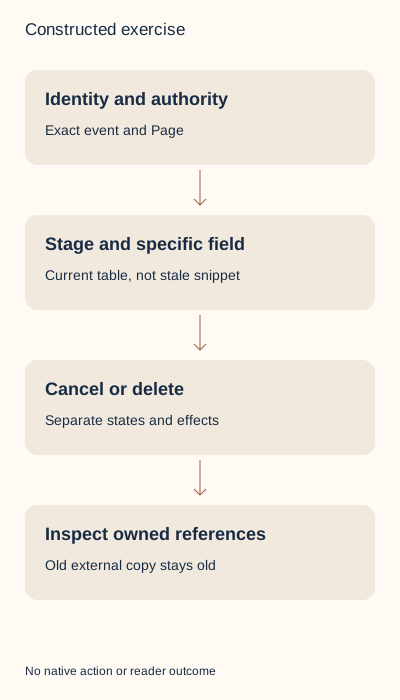
Identify the exact existing event, organizing profile or Page and your authority, then choose the required field or retirement action. Current complete editing help permits some changes during and after an event; organizer, type and format remain fixed. Cancellation and deletion have separate stage rules and consequences. Inspect the actual offered control and saved state, then review external references you own. A plan, notification rule or vanished editor is not an observed update or delivered attendee message.
What you’ll take away
- Use the current specific field-and-stage matrix rather than a blanket no-edit rule.
- Cancellation keeps a different event state from deletion and cannot be reversed.
- A saved native change does not establish updated external announcements or calendar copies.
Find the exact organized event before choosing an operation
Begin with the existing event URL or private reference and a concrete required correction. Confirm the organizing profile or exact Page. The Page FAQ gives super and content admins management rights, even when they are not attendees. A Page admin’s personal event remains organized by that individual; their Page role alone does not transfer it to the Page. Similar titles or attendance do not establish authority.
The newly documented Event Admin groups managed events and offers Switch account between profile and managed Pages. Its All events view has search, format/stage filters and sorting; More offers edit, cancel or delete. The task-specific route also opens the event, Manage event and the required operation. Use the actual offered surface and selected identity. Finding a row is not permission to use its destructive action. This guide performs none.
Choose the particular field in the current stage table
A stale search representation of the editing help says changes stop once the event begins. The fresh complete English and German task bodies read for this guide instead contain a stage-specific table. Name, description, speakers, cover image and industry can be changed before, during and after the event. Organizer, type and format cannot change in any of those stages. Keep the current body and its identity beside the decision; the cached blanket sentence should not override it.
Timezone and start/end date/time are listed as changeable only before the event starts. Location/address, venue and external link are changeable before and during, not after. Page registration forms have an all-stage row, consistent with the specific form help allowing changes after the event ends. That does not backfill earlier registrants or alter their data. Cancellation has its own no-edit state; the general stage table does not unlock a cancelled event.
| Detail group | Before start | Ongoing | Ended |
|---|---|---|---|
| Organizer, type, format | No | No | No |
| Timezone, start/end date and time | Yes | No | No |
| Address/location, venue, external link | Yes | Yes | No |
| Name, description, speakers | Yes | Yes | Yes |
| Cover image, industry | Yes | Yes | Yes |
| Registration form, Pages only | Yes | Yes | Yes |
Save the intended change and read back the exact result
For an allowed field, compare the proposed wording and original source before Save. A change from 17:00 to 18:00 UTC is an actual hour shift; a timezone display conversion can preserve the same instant. Do not confuse the two. Keep both source instants when adjusting an owned announcement. The supplied external-before and external-proposed text files deliberately differ by one hour; they are teaching artifacts, not LinkedIn exports or calendar subscriptions.
The task route uses Edit event and Save, with the mobile path through My Network, Manage my network and Events before the selected event’s Manage control. After an intentional authorized save, reopen the exact event and compare the field, identity and time context. A submitted Save without readback remains unverified. Do not recreate an event merely because a control is missing; inspect the correct account and documented branch first.
The current edit help says location changes notify attendees, no change notifications go to attendees after the event ends, and added speakers may be notified at any stage. The Page FAQ more broadly lists day/time/venue changes and cancellation notifications. These are documented behaviors, not proof a particular person received or read a notice. A post-event saved description cannot be reported as a delivered attendee update.
Choose cancellation and deletion deliberately
The cancellation help calls both actions permanent and irreversible and says cancellation precedes deletion. External-link online and in-person events can be cancelled before or during the event. LinkedIn Live cannot be cancelled after streaming starts or its start time begins. A planned Live with no stream observation still needs its actual stage; absence of a stream alone does not extend the pre-start branch.
After cancellation, members cannot join, the help says attendees are notified, existing posts/comments remain accessible to organizer and attendees, and organizers cannot edit details. The cancelled event remains in the organizer’s hosted list. This is not deletion, attendee-message delivery proof or removal of every external reference. Do not cancel a real event as a test of an editing control.
The help permits deletion immediately after cancellation before start, prohibits deletion during an ongoing event and permits it immediately after end. Keep its prerequisite to cancel rather than treating end as an implicit cancellation. Deletion makes the event inaccessible under the documented native scope, removes the associated feed post/reshares and organizer-list/search presence; it does not send a deletion notification. Those are separate consequences from cancellation and do not establish erasure of external or downloaded copies.
Resolve twelve complete constructed lifecycle decisions
E1 plans a Page content-admin name edit before start. E2 plans an ongoing description edit under the current table. Both retain unobserved saves. E3 holds an ongoing start-time edit; this field is locked without making every description uneditable. E4 supplies a matching saved description for the exact ended event and keeps attendee notifications separate.
E5 targets E2 instead of intended E1 and is held before role or timing decisions. E6 tries to change organizer and is held in every stage. E7 supplies an ongoing streaming Live and holds cancellation. E8 supplies an ongoing external-link event and records the documented cancellation plan without inventing its execution. E9 holds deletion while ongoing, even with a supplied cancelled flag.
E10 has an ended event and prior cancellation supplied: deletion can be planned, but the result is unknown. E11 supplies the exact cancelled state and preserves the separate accessible-content scope. E12 supplies the exact deleted state while external copies remain uninspected. These observations are authored fictional inputs, not events we accessed. The exercise requires an explicit supplied stage and holds unknown stages rather than deriving an untested exact-start boundary.
Keep native state, notifications and external references separate
The packet has twelve actual event CSV rows alongside ten file-handoff rows, separate observations, complete bilingual explanations, blank records and two distinct external-announcement text versions. Extract it and run python3 check.py with existing Python 3. The checker distinguishes field/stage, organizer identity, prior cancellation, supplied saved state and external-copy limits. The standard-library rebuild reproduces every artifact without a network request or event action.
For real work, retain the minimal event reference, actual organizing identity/authority, reliable stage, required field/action, offered control, intended change and separately observed result. Check controlled website announcements, joining destinations and calendar copies through their own appropriate paths. Our unchanged old text remains a visibly stale reference after the proposed hour change; neither a native Save nor a deletion rule changes those file bytes.
Sixteen primary English/German bodies covering these two guides were read on 2 November 2026; receipts use UTC. No private event, Page, attendee, calendar, notification or account was accessed or changed. Current source reasoning and constructed records are not native UI/download proof, independent review, reader preference, event attendance or customer value.
Sources & product references
Product details reflect the publication date. External features and interfaces may change.
- LinkedIn: Current event field-by-stage editing matrix (en)
- LinkedIn: Current event field-by-stage editing matrix (de)
- LinkedIn: Separate cancellation and deletion conditions (en)
- LinkedIn: Separate cancellation and deletion conditions (de)
- LinkedIn: Page organizer authority and notifications (en)
- LinkedIn: Page organizer authority and notifications (de)
- LinkedIn: Separate Page registration-form lifecycle (en)
- LinkedIn: Separate Page registration-form lifecycle (de)
- LinkedIn: Event Admin and account/stage context (en)
- LinkedIn: Event Admin and account/stage context (de)
- Original constructed inputs, exact files, complete bilingual decisions and local checker


