
The short answer
Identify the exact published object before changing its comment control. Member feed posts offer Anyone, Connections only and No one; Pages have their own on/off choices. Crucially, LinkedIn says turning comments off preserves existing feed-post comments, while disabling comments on a published article deletes them. Verify the object and consequence first.
What you’ll take away
- Comment permission and post visibility answer different questions.
- Disabling article comments can delete the existing discussion.
- Inspect the next draft: a feed-post choice can become the default.
Identify where the discussion lives
A feed post linking to an article and the article itself can each have a discussion. A newsletter edition may also have a separate promotional post. Open the actual URL and note the publisher and object. The setting on one surface is not evidence that another conversation changed. This matters when a recap is shared as text, a document and a long article.
Do not use a viewing restriction as a substitute for comment moderation. Someone may be able to see a post without being allowed to comment. Turning comments off does not remove the text, attachment, prior screenshots or the reason a factual correction is needed. Correct the underlying claim separately when that is the problem.
| Object | Documented control | Existing comments |
|---|---|---|
| Member feed post | Anyone / Connections only / No one | Turning off does not delete them |
| Page feed post | Anyone / No one in Page settings | Inspect the actual Page control; do not apply the article rule |
| Published article | Comment settings, desktop workflow | Disabling deletes them; re-enabling does not restore them |
Match the choice to the intended discussion
If the post asks for professional experiences from outside your network, a first-degree-only choice may exclude exactly those contributors. If you are sharing a factual reference and cannot maintain a discussion, no new comments may be a reasonable boundary. State a useful alternative feedback route only if you actually monitor it and are willing to receive that feedback.
For a fictional release note, Mira wants questions from customers she is not connected with. She leaves feed-post comments available and allocates a review time. When one reply is abusive, she considers the specific reporting or moderation action instead of treating every disagreement as abuse. Turning off the entire thread and answering a material criticism are different decisions.
Change a member or Page post deliberately
For a member draft, current help places Comment control under the publisher dropdown; after publication, use the post’s More menu and its who-can-comment control. Select the intended option and save. LinkedIn says the choice is remembered for future member posts. Reopen the setting and inspect the next unrelated draft so a temporary restriction does not silently become your long-term plan.
For a Page, confirm that you are in the intended admin identity and use its own comment control. The current Page posting help documents Anyone and No one, not the personal Connections only menu. Check the available desktop/mobile path. Do not promise a Page setting you saw only on your personal profile.
Pause before disabling an article discussion
LinkedIn’s article-specific help says disabling comments on an already published article deletes the existing comments. Re-enabling does not bring them back. It documents a desktop route through the article’s comment settings and says this disabling control is unavailable in the mobile app. A reversible-looking toggle therefore has an irreversible discussion consequence.
Constructed hold case: Jo wants to pause new responses while preserving a useful correction thread on an article. The feed-post rule would suggest existing comments survive, but that is the wrong object. Jo stops before confirming No one and reviews a more targeted response. Copying every commenter into a public archive is not an automatic fallback; preserve only what is necessary and appropriate.
Diagnose a missing comment action before retrying
First check whether you are viewing the right post as the right member or Page. A non-connection may be excluded by a member’s connections-only choice, comments may be disabled, or a member/Page may be blocked. Current commenting help also describes platform limits and reduced visibility after excessive or automated comment creation. A missing control alone does not establish censorship, an algorithm penalty or a technical fault.
Do not switch accounts, automate retries or repeatedly submit the same response to bypass a restriction. If a save result is uncertain, reload the actual thread and check before sending again. Keep an error note without collecting unnecessary commenter identities. This is a troubleshooting workflow, not an authorized moderation action on anyone’s account.
Keep the decision and its consequence separate
The worked cases distinguish an open member discussion, a Page identity mismatch and a stopped article action. The private record asks for object URL, prior setting, intended discussion, consequence, actual saved setting and unresolved checks. Use a short neutral reason rather than labeling named people in a reusable template.
No real comment control was changed for this guide, and no reader comprehension or harassment outcome has been measured. After an authorized real change, inspect the saved control and the visible thread separately. An absent input box does not prove that existing comments were erased, and a re-enabled box does not prove an article’s old discussion was restored.
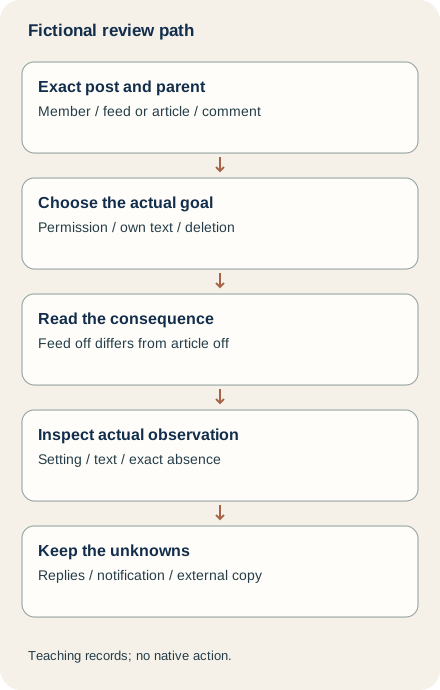
Check six exact-object permission, edit and deletion records
C1 supplies No one on a member feed post while two existing comments remain visible. Keep the setting and visible discussion separate. C2 instead wants to retain an article discussion while disabling it: hold that conflicting plan under the article-specific deletion warning. The supplied cases do not change a control, reproduce a private account or test whether every viewer sees the same result.
C3 supplies a saved own comment corrected from 12 to 15 definitions, retaining the local-exercise qualification. The current editing task describes the comment’s own More/Edit route and Save Changes, with an edited label afterward. Reopen the exact parent and text; our supplied record does not observe that label, reading or agreement. The editor for a post is a different object. A nearby reply with the correct number does not establish correction of the intended comment.
C4 proposes deleting a parent while preserving its two replies and four likes. Hold that plan: the current feed deletion task says all likes and replies on a deleted comment are removed. It covers your comments on another member’s post and comments on content you shared, not a general ability to edit anyone’s words. C5 supplies an observation of a different parent. C6 supplies absence of the exact own comment in one view; external copies remain unknown. None proves that earlier words were unseen or notification copies recalled.
Use the private worksheet before claiming the discussion changed
The new local packet supplies six comment cases beside twelve separate profile-project cases, independent facts/plans/observations, complete bilingual decisions and four technical diagrams. The project’s 12/15-definition files are actual teaching DOCX packages, not customer evidence. Extract with existing Python 3 and run python3 check.py. The offline checker rejects cross-object observations, unsupported edited text, deletion/preservation conflicts and external-erasure claims. It does not authenticate people or certify the meaning of arbitrary prose.
Record intended member, post/article and parent, actual goal, offered action, preservation needs, submitted state, exact later observation and unresolved copies privately. These four relevant English/German help tasks were fully read on 2 November 2026; this extension does not claim a new Page-control test. All cases remain fictional. No post, article, comment, setting, report or account action occurred. The original guide and cover are retained, with no new topic, formal research, distinct aid-type or genuine reader/customer credit.
Sources & product references
Product details reflect the publication date. External features and interfaces may change.
- LinkedIn: feed-post comment settings and retained comments
- LinkedIn: article comment settings and deletion consequences
- LinkedIn: Page posting and comment controls
- LinkedIn: commenting and limits
- Original complete bilingual worked cases and private records
- Vollständige eigene Fälle und private Arbeitsbögen
- LinkedIn: Comment object and consequence (a523384, en)
- LinkedIn: Comment object and consequence (a523384, de)
- LinkedIn: Comment object and consequence (a522438, en)
- LinkedIn: Comment object and consequence (a522438, de)
- LinkedIn: Comment object and consequence (a528132, en)
- LinkedIn: Comment object and consequence (a528132, de)
- LinkedIn: Comment object and consequence (a526256, en)
- LinkedIn: Comment object and consequence (a526256, de)
- Original executed fictional comment and project records


