
The short answer
Review delivery/read and typing indicators in Data privacy, and active status separately in Visibility. These controls disclose different signals. Missing receipts do not prove that a message was unread, and an active indicator does not prove someone is available, interested or obliged to reply.
What you’ll take away
- Keep receipt settings and active-status audience separate.
- Read the InMail and message-request exceptions.
- Review privacy settings without sending a test message.
Choose a disclosure goal before reading social meaning into icons
For an asynchronous professional conversation, decide which presence signals you want to share and what response expectations you can actually meet. A receipt is a platform observation, not evidence that the recipient understood a request, agreed to it or consented to a campaign. Keep the conversation’s actual words more important than the icon.
This is one review of messaging observability, with two related control areas. It does not require opening private conversations, sending a message or tracking another person’s activity. A private worksheet can record the setting and intended boundary without copying an inbox or another member’s identity.
Review the receipt and typing control
The current help uses Settings & Privacy, Data privacy, Messaging experience and Delivery and typing indicators. Turning the control off hides the reading/typing indicators for everyone in the conversation, including you. Inspect the saved control instead of assuming the absence of an icon proves its state.
The source excludes InMail read receipts for senders and says request receipts appear only after acceptance. Identify the actual message type before drawing a conclusion. A generic “Sent” status can remain when receipts are disabled; it does not establish that the recipient never read the text.
Choose the active-status audience separately
Active status has its own Visibility control with connections, all members or no one. The help says hiding your status also removes your ability to see connections’ active status. Reopen that audience selection after an intended change; a receipt toggle does not choose this audience.
Do not equate a displayed active state with available work time or a promised response deadline. Keep any real response agreement in the conversation itself. Avoid cycling settings to observe another member or sending repeated tests when an account or device observation is unclear.
Resolve three messaging-signal mistakes
M1 — Constructed no-receipt case: a sent message has no read photo and the relevant receipt state is unknown. Decision: record “no read indicator observed,” not “ignored” or “unread.” Result: message acceptance and understanding remain unknown; no repeat contact is needed to manufacture a receipt.
M2 — Constructed privacy review: a member hides active status but still has delivery/typing indicators enabled. Decision: inspect both controls and choose each intended disclosure separately. Result: two saved preference observations, not a contradiction or proof that hiding active status failed.
M3 — Constructed message-type exception: an InMail sender sees no read receipt. Decision: apply the source’s InMail boundary rather than diagnose the recipient’s interest from the missing signal. Result: no invented rejection, read time or permission to pursue the person elsewhere.
Use explicit expectations for meaningful follow-up
For an already authorized work conversation, state the question and any genuine deadline in plain text. An agreed review time is better evidence of an expectation than a green dot. Keep an unanswered question unresolved instead of using presence data as an agreement or claiming a customer result from a delivered message.
If a recap describes relationship work, use a verified contribution or permission to quote. Counts of sent messages, read signals and active connections cannot establish relationship quality. Do not turn a worksheet into a surveillance log or disclose another person’s private communication habits publicly.
Record settings without collecting conversations
The worksheet records disclosure goal, exact receipt state, active-status audience, reciprocal limitation, message-type exception and check time. The signal interpretation field should separate observed from inferred. Keep real settings private and avoid storing message contents that the task does not need.
The primary pages were read on 1 November 2026. All cases are constructed. No message, InMail, account preference or presence observation about a real person was created. This workflow does not measure response rate, attention, consent, reader preference or revenue.
Work through six separate signal observations
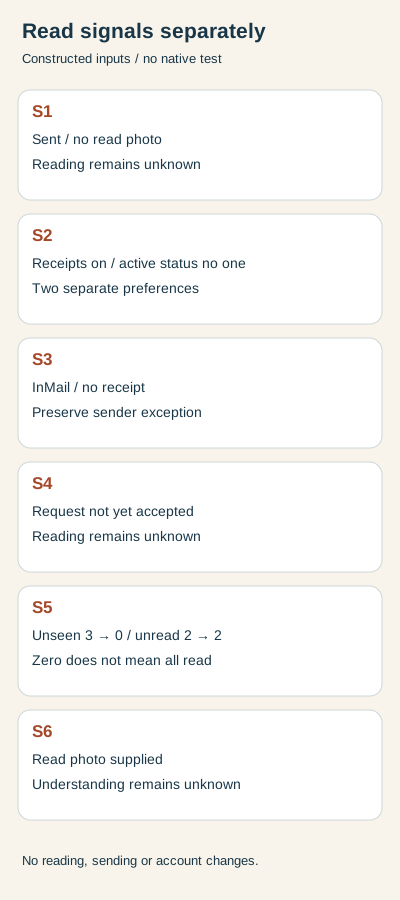
The supplied S1 record is an ordinary member message marked Sent without a read photo; the relevant preference is unknown. Keep reading unknown. S2 supplies the owner’s receipt preference as on and active-status audience as no one. Record two distinct preferences rather than treating their combination as a failed setting. These are fictional inputs, not observations of a real account or recipient.
S3 supplies InMail without a sender read indicator; S4 supplies an unaccepted message request without one. Each has a documented exception. Neither absence establishes unread text, rejection or permission to contact again. S6 supplies a read photo for an ordinary message: preserve that declared indicator while leaving understanding and an agreement to reply unknown.
S5 supplies three unseen and two unread messages. After the declared Messaging-icon review, the counts are zero unseen and two unread. A cleared red unseen badge does not mean every conversation was read or answered. One sentence in the German indicator help calls the red count unread, despite its unseen heading. The English body and German closing note preserve the distinction. Our example keeps both counters instead of turning that wording discrepancy into a single universal badge count.
Rebuild the observations before using a private record
The download includes six actual CSV input rows, calculated decisions, full English/German explanations and blank private records. Extract with Python 3 already available and run python3 check.py. The standard-library rebuild reproduces the results and localized diagrams without a network request, setting change or message. Duplicate case IDs, another product, negative counters, a changed unread count in S5 and unsupported unread or understanding claims are rejected.
For real work, record the disclosure goal, actual receipt preference, separate active-status audience, message type and each observation with its time. Keep an unknown setting unknown instead of deriving it from a missing icon. The three primary pages were rechecked in both languages on 2 November 2026. No real message, account observation, reader preference or customer result was added by this constructed exercise.
Sources & product references
Product details reflect the publication date. External features and interfaces may change.
- LinkedIn: Delivery, read and typing indicators
- LinkedIn: Active-status audience and reciprocity
- LinkedIn: Sent versus read indicators
- LinkedIn: Nachrichtensteuerung und Indikatoren (a567370, Deutsch)
- LinkedIn: Nachrichtensteuerung und Indikatoren (a553076, Deutsch)
- LinkedIn: Nachrichtensteuerung und Indikatoren (a570651, Deutsch)
- Original constructed signal observations and complete bilingual records


