
The short answer
Identify the personal-profile button and the control actually offered to your account. Before adding or editing it, check whether replacing profile-added services is intended. Match an offered label to the reviewed destination, choose additional visibility deliberately and reopen the same member’s button after an intended change. A plan-table check, submitted Done or visibility off does not prove activation, a saved link, removal or privacy.
What you’ll take away
- Adding or editing this button can replace services previously added to the profile.
- The dedicated task and general plan table have different eligibility scopes; inspect the actual offered control.
- Profile presence, extra-surface visibility, destination content and customer outcomes need separate evidence.
Identify the personal button and actual offered control
A year-in-review or portfolio may deserve a clear destination on your profile. Start with the exact personal member profile and the action that destination should support. The custom button is a separate introduction control. Contact info holds contact routes; Featured presents a work sample; a Service Page manages an offer. Completing one does not establish the others.
The dedicated current button task names a selected group of Premium Business, Sales Navigator and Recruiter Lite subscribers. The general plan matrix also marks Custom button for Premium All-in-One, alongside Premium Business, Sales Navigator Core and Recruiter Lite. Preserve both statements: do not exclude All-in-One because the narrower task omits it, or promise that a plan name alone makes a control available to every member.
Inspect what is actually offered in the intended account. If the control is missing, keep availability unresolved. This guide does not require a trial, purchase, plan change or another person’s account. The old Creator Mode introduction-hyperlink task concerns a removed former field; it does not establish that Contact info, Featured or the custom button has disappeared.
Decide the services replacement before adding or editing
LinkedIn’s dedicated task says you can have services or a custom button on the profile: adding or editing the button replaces services previously added through Add profile section. Treat even a small URL edit as a dependency decision. If the purpose is to retain that services presentation, stop the proposed change and choose an appropriate existing route instead.
Record the intended outcome before acting: retain the profile services, or deliberately replace that presentation with the button. Our hold for an unintended replacement is a planning safeguard, not a tested native approval lock. This wording does not prove deletion of an underlying Service Page, requests or client data, and removing a button does not by itself prove restoration of services.
Match an offered label to the actual destination
Choose from the offered preset labels rather than inventing arbitrary button text. A portfolio label should lead to the intended reviewed work; a booking label should lead to the intended appointment route. Check the complete URL and the content it currently resolves to within your authorized access. A familiar address can retain an older page, redirect elsewhere or describe a different offer.
The local exercise uses the same fictional portfolio address with two real HTML drafts: r1 has twelve teaching entries and reviewed r2 has fifteen. Both are readable files, and neither is a real member destination. Comparing the selected local revision exposes a stale handoff; it does not certify an external site, account ownership, rights, security or reader comprehension.
| Personal-button preset in the English task | Intended destination to check |
|---|---|
| Visit my store | The maintained store |
| Visit my website | The intended website |
| View my portfolio | The reviewed work collection |
| View my blog | The intended publication |
| Book an appointment | The intended booking route |
| View my newsletter | The intended newsletter |
| View my services | The intended service information |
Use the personal introduction route for the intended operation
The desktop task starts at Me, View profile and Add custom button in the introduction. Select the offered option, enter the URL and finish with Done. On mobile it starts with the profile photo, then the profile photo again, and the introduction’s button control. Use the actual offered route; an absent control is not permission to substitute a Company Page or an old Creator Mode field.
For an existing button, the task edits the introduction, opens Edit custom button and offers a different preset, a URL edit or Remove, followed by Done. Keep the same member and button in view. A proposed removal and a submitted removal have different evidence from a later observed absence.
Company Page instructions use Page super-admin view, Edit page, Buttons and Save. They also have separate Premium/More visibility and conditional Request services or Request demo options. Those Page controls and Visitor Analytics do not become personal-profile authority, labels or analytics. Do not apply the Page procedure merely because both objects contain a button.
- Confirm the exact personal member, intended operation and actually offered control.
- Resolve the services-replacement decision before an add or edit.
- Compare the offered preset, complete URL and reviewed destination revision.
- Choose additional visibility deliberately and submit only the intended operation.
- Reopen the same button and record the actual fields or absence separately from submission.
Separate profile presence from additional visibility
The task describes the button on the profile, search results, messages and feed. Its Increase button visibility setting is on by default and controls display on posts, messages and search results. Inspect its actual state instead of assuming that a default proves the current setting.
Turning that setting off is not the Remove operation and does not make the whole profile private. In the constructed B6 observation, extra visibility is off while the same profile button remains supplied-present. That bounded record cannot establish actual exposure or absence across every surface, old copies, enquiries or delivery to a particular person.
Verify the same saved or removed button
After an intended change, inspect the same member’s button and compare the preset, destination and visibility choice with the reviewed plan. Keep a submitted Done unresolved when later fields are unobserved. A current destination read and a saved profile link answer different questions; neither proves that a visitor used it or completed a booking.
After an intended removal, verify the exact button’s absence in the scope you observed. Do not infer erasure of external copies, removal from every historical surface or restoration of services. Clicks, enquiries, bookings and verified payments are separate outcomes with their own evidence and attribution requirements.
Work through twelve supplied records and keep a private blank
The original exercise has twelve actual CSV plans and twelve independent supplied observations. B1 and B2 leave the offered control unknown despite named Business and All-in-One plans. B3 holds an edit that must retain existing services. B4 has a portfolio label with the declared blog destination. B5 supplies Done as submitted but no saved-button readback.
B6 supplies matching fields with extra visibility off and the profile button still present. B7 substitutes a Company Page. B8 supplies only the exact button’s absence after removal. B9 supplies another member’s readback; B10 asks for an unoffered arbitrary label. B11 selects the actual old twelve-entry r1 HTML instead of reviewed fifteen-entry r2. B12 supplies matching current fields and local r2 content. All are fictional teaching records, not observations of real accounts.
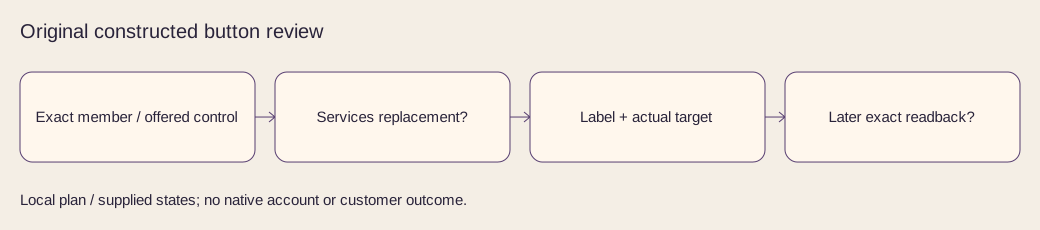
The packet contains four actual localized HTML drafts, two original text plans, two localized workflow diagrams, complete decisions and private blanks. With existing Python 3, extract the ZIP and run python3 check.py. Rebuild into another empty folder with python3 build.py --out /path/to/empty-folder. The standard-library rebuild reproduces all 23 files, including the ZIP, byte for byte in the recorded runtime; no installation or network is needed.
The checks reject duplicate or missing records, changed source quantities, unsupported claims, unoffered operations and malformed supplied states. They preserve unknown availability, saving, removal and outcomes. These known-input and file checks cannot authenticate an arbitrary account or determine arbitrary destination meaning. No private profile, Page, service, button, purchase, contact or message action occurred; current English and German primary tasks were checked on 2 November 2026.
Sources & product references
Product details reflect the publication date. External features and interfaces may change.
- LinkedIn: personal custom button, availability and services replacement
- LinkedIn: German personal-button task and labels
- LinkedIn: current plan comparison, including All-in-One
- LinkedIn: current German plan comparison
- LinkedIn: separate Company Page button task
- LinkedIn: separate German Company Page button task
- LinkedIn: removed former Creator Mode introduction hyperlink
- LinkedIn: German former introduction-link task


