
The short answer
Edit the custom part of the profile address in the profile’s Public profile & URL area, then save and reopen the actual destination. Check the references you control separately. A custom profile address, its assigned address, prior linked addresses and post URLs have different rules; do not assume every old link redirects forever.
What you’ll take away
- Choose a stable identity reference before spending a limited change.
- A new address does not itself edit a résumé, QR code or exported recap.
- Record the actual saved destination and each important dependent link.
Inventory the address and the places that use it
Start with the actual profile, not a typed address from memory. Copy the current reference and identify whether the task is a cleaner custom address, a broken external link or an attempt to hide old information. These needs can require different decisions. A shorter address does not correct misleading profile text or change who may view it.
List the references you control: résumé, website, contact card, QR destination and exported recap. An already downloaded PDF is a separate file. Keep the list small and purposeful; do not collect other members’ addresses or use a profile change as a way to manufacture new people in analytics.
Read the current custom-address conditions
The primary help distinguishes one custom address from the assigned address. It describes a 3–100 character custom portion, case-insensitive matching and limited changes within six months. Availability is first come, first served. Record the actual permitted value instead of assuming a preferred brand string can be reserved or released on request.
The same help describes prior custom addresses remaining linked for a period unless explicitly unlinked, followed by different availability rules. Read those exact current warnings before unlinking. Profile-URL behavior must not be borrowed from the separate help about changed post URLs; this guide guarantees neither permanent redirection nor exclusive ownership of an abandoned string.
Save the intended change and open the result
The documented desktop route opens View profile, Public profile & URL and the edit control for the custom address. Change the final custom portion and Save. The mobile route reaches the profile address through Contact info. Use the actual control for your account; visiting this guide does not change or reserve an address.
After an authorized save, reopen the profile and copy its displayed address. Test the intended current reference in an appropriate context, then inspect the important external references on your list. A browser result demanding sign-in is an access observation, not automatically an invalid address. Keep identity and public-visibility checks separate.
Resolve three address decisions
U1 — Constructed unavailable name: the preferred custom portion is already assigned. Decision: choose another permitted stable variation or retain the current address; do not create another account or promise the platform will release the name. Outcome: a deliberate held or alternative choice, not a failed identity verification.
U2 — Constructed stale résumé: the profile’s new address opens correctly, but a previously exported résumé still contains the old string. Decision: inspect that actual link, update the résumé source and export a reviewed version if needed. Outcome: current profile checked; the old distributed file remains a separate reference, not automatically repaired.
U3 — Constructed prior-address removal: a member wants to unlink a prior custom address. Decision: read the current unlink/reuse warning, identify dependent references and perform only the intended authorized operation. Outcome: the observed linkage state is recorded; permanent control of the released string and universal old-link recovery are not claimed.
Keep a minimal address handoff record
Use the private record for old/current address, purpose, actual save result, prior-link decision and status of the few important references. An address suffix alone is not a durable substitute for account/source identity in a private archive. Use authorized source identifiers when comparing earlier records rather than merging or splitting people from URL spelling alone.
These cases are original constructions based on current public help read on 1 November 2026. No profile change, reservation, unlinking or real account visit was performed. Finish with the current destination checked and remaining references listed; a saved new address is not measured visibility or revenue.
Check post references independently of a retained profile alias
LinkedIn’s URL help describes up to five changes in six months, then a further six-month restriction after the fifth. It describes the previous custom address remaining linked for six months unless unlinked, with a separate seven-day period after unlinking before others can claim it. These are different events; calendar months are not a fixed number of days. Read the current warning before making an intentional change.
The shared-content help warns that changing the custom profile URL also changes post URLs and that previous post URLs do not redirect for privacy reasons. The same page describes different redirect behavior when the post itself is edited. Recopy an important post’s current link from its own menu and inspect the intended content; a working old profile alias does not validate that separate post reference.
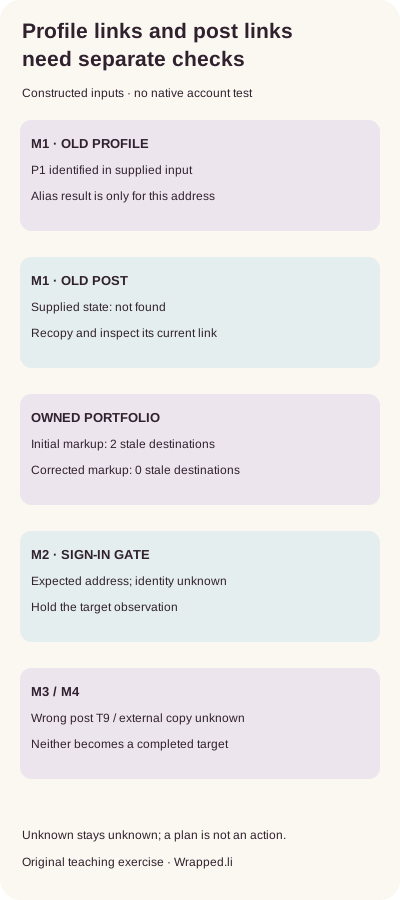
The executable exercise M1 supplies an old profile alias identifying fictional member P1 and an old post address with a not-found state. The initial portfolio contains both old href targets even though its visible biography label already says current. The corrected supplied file uses the new profile address and the separately copied post address; its supplied target observations identify P1 and post T1. These are constructed inputs, not observations of LinkedIn.
Separate the file check from the destination check
The actual HTML-text fixtures have two stale destinations in the initial file and zero in the corrected file. M2 supplies a résumé link with the expected address but a sign-in gate and no observed identity: hold the target as unverified. Do not call it broken merely because it asks for sign-in, or verified because some page loaded. M3 has the expected post address but identifies T9 rather than intended T1: hold the wrong target despite the matching string.
M4 is an external copy outside the owner’s control with an unknown observation. Completing the owned portfolio cannot establish that this copy, an old attachment or a printed QR code changed. Keep the unknown item and a proportionate next step separate from the completed owned scope. Do not collect other members’ addresses or create a test recipient to fill the record.
The download contains the five-row link-inventory CSV, initial/corrected HTML-text files, supplied observations, complete English/German decisions and a blank private record. With Python 3 already available, extract the ZIP and run python3 check.py. The checker parses actual href attributes and derives target decisions from supplied states without network access. For real use, reopen the actual exported file and record target identity, viewing context, time and remaining copies. This exercise supplies no native UI, device, reader or customer proof.
M1–M4 are constructed cases using reserved example.test addresses. Their observations must not be copied into a real completion record.
Sources & product references
Product details reflect the publication date. External features and interfaces may change.
- LinkedIn: Custom, assigned and previous public profile URLs
- LinkedIn: Public profile access is a separate control
- LinkedIn: current URL limits and previous addresses, English
- LinkedIn: URL-Grenzen und frühere Adressen, Deutsch
- LinkedIn: post URLs after a custom profile-URL change, English
- LinkedIn: Beitrags-URLs nach Profiladressänderung, Deutsch
- Original constructed link and edition exercises with bilingual records


