
The short answer
Use the desktop Profile language controls to add a language and supply your own translated content. Review the selected primary language and the actual fields in each version. A secondary language is part of the existing profile, not a second member account; viewers’ language context and the primary fallback determine which version they initially see.
What you’ll take away
- Translate the professional meaning, dates and scope rather than adding unsupported achievements.
- Inspect the selected primary language and each changed field.
- A new language version does not prove that an old PDF or public snippet changed.
Choose the audience and stable meaning
Write down the reader need before adding a version: for example, an English professional summary for an international audience alongside an existing German profile. Keep role, employer, dates and evidence boundaries consistent. A language version should not quietly promote a planned responsibility into a completed achievement.
Keep source wording and the proposed translation beside each other. Names and job titles may need a readable explanation rather than a new credential. If the original claim is ambiguous, resolve it first or preserve the uncertainty; translation is not a way to make an unsupported result more confident.
Create the language version in the current desktop workflow
LinkedIn’s primary help describes View profile, the Profile language edit control and Add language. Choose the intended language, enter appropriate name/headline wording and inspect any Make primary language choice before creating the version. The help says creation is unavailable in the mobile app; a missing mobile control does not prove you need another account.
Translations are not supplied automatically by this workflow. Add or translate personal content in the secondary version and reopen the actual fields to inspect the result. A completed create dialog proves a created version, not that every professional section has been translated correctly or that all viewers have seen it.
Review primary fallback and the actual fields
The official guide describes matching a viewer’s LinkedIn language when a corresponding version exists, otherwise the primary profile language. Viewers can also select an available language. Check the primary selection and the version you are editing; a manually selected screen is not evidence of every visitor’s default presentation.
Treat a later source change as a review task for relevant versions. Inspect dates, role wording and caveats separately instead of claiming that an edit synchronized every field. If a section has different controls, keep that observation and consult the current secondary-profile editing help. Exported files and search listings require their own checks.
Resolve three language-version failures
L1 — Constructed overstated role: the source says “prepared a draft handoff checklist,” while the translation says “led a completed transformation.” Decision: replace it with a faithful drafting statement and preserve the unmeasured outcome. Outcome: meaning corrected in the inspected field; no new credential or customer result is invented.
L2 — Constructed fallback surprise: German is primary and an English version exists, but a visitor using another unsupported language sees German. Decision: inspect the recorded primary/fallback rather than creating duplicate accounts. Outcome: documented fallback explains the observation; language availability is separate from public access and search ranking.
L3 — Constructed stale date: a role end date is corrected in one language, while the other version and a downloaded PDF still show the old date. Decision: inspect the actual second field, then review the PDF source/export separately. Outcome: a list of checked and unresolved objects, not a claim of automatic synchronization.
Keep a language review record
The private worksheet pairs source wording, version, field, faithful translation, primary setting and observed readback. For removal, inspect the actual secondary-language removal confirmation and preserve needed authorized source text first. A visibility review or app-language change is not a request to delete a profile version.
The workflow and cases are documentation-based teaching material checked on 1 November 2026. No profile language, account, primary setting or live section was changed. A consistent bilingual identity helps prevent contradictory claims; this article does not measure audience preference, discovery or sales.
Execute a source change across the declared language editions
LinkedIn’s editing help says that primary-profile updates need to be made in secondary-language profiles and that management is available on desktop, not mobile devices. It describes selecting the language tab inside the relevant section/detail edit. Inspect the actual affected field and reopen the selected edition after saving; do not assume every field has identical controls or that a primary edit maintains the other text.
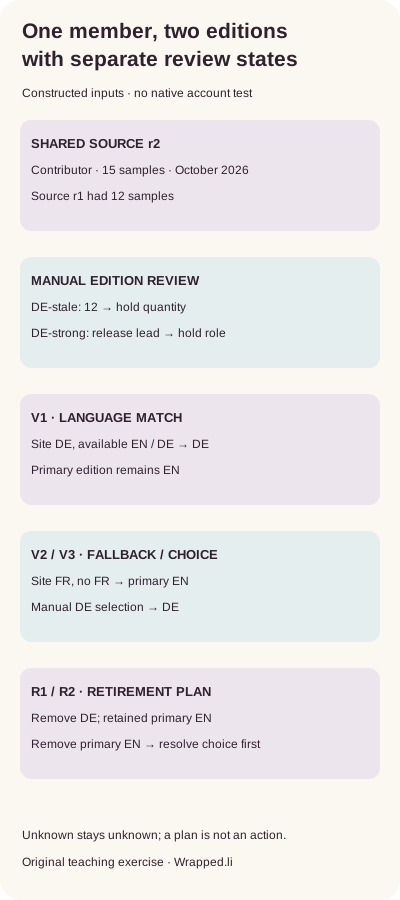
The supplied source r1 says fictional member P1 contributed to release testing, reviewed 12 samples and did so in October 2026. EN-r1 and DE-r1 preserve those facts. Source r2 changes only the quantity to 15. DE-stale retains 12 and is held for quantity; DE-strong has 15 but claims release leadership and is held for role. DE-r2 preserves contributor, 15 and the month. The checker compares supplied semantic fields, not translation quality inferred from fluent prose.
With primary EN and available EN/DE, viewer V1 using German gets DE. V2 using French has no FR edition and falls back to EN. V3 also uses French but explicitly selects DE and gets DE. The older viewing help refers to setup language; the specific creation help documents a changeable primary language and its fallback. These are constructed model decisions, not observations of real viewers. Record the actual selected edition and viewing context for a real readback.
| Supplied state | Mismatch or selection | Exercise decision |
|---|---|---|
| DE-stale against r2 | 12 rather than 15 samples | Hold quantity |
| DE-strong against r2 | Release lead rather than contributor | Hold role |
| DE-r2 | Contributor, 15, October 2026 | Declared facts align |
| V1 / V2 / V3 | Language match / primary fallback / manual choice | DE / EN / DE |
Review the retained edition before removing a secondary one
Read the actual address shown for each edition instead of inventing a language suffix from an older example. A language-specific link does not prove current text or a particular viewer’s default. Before removal, retain needed authorized source text, confirm the primary edition that should remain and list affected references. The documented secondary-language removal uses the profile-language control, X beside the language and Remove; this exercise performs none of those actions.
R1 plans to remove DE while retaining primary EN, so the declared German-language viewer then falls back to EN. R2 proposes removing EN while it remains the chosen primary; our exercise holds that unresolved planning choice. This is our planning safeguard, not an observed platform rejection. A plan is not an actual removal, readback or proof that old exports and third-party copies changed.
The download supplies actual edition JSON, source revisions, viewer choices, retirement plans, complete bilingual decisions and a blank record. With existing Python 3, extract the ZIP and run python3 check.py. Keep one source-fact revision and each edition’s last reviewed revision, exact saved text, shown address and viewing context. Reopen all affected editions after a later fact changes. No profile operation, translation certification, real reader preference or customer outcome is established.
Sources & product references
Product details reflect the publication date. External features and interfaces may change.
- LinkedIn: Create, select primary and remove a profile language
- LinkedIn: Shared profile URL and language suffix
- LinkedIn: creation and primary-language choice, English
- LinkedIn: Erstellung und Primärsprachenwahl, Deutsch
- LinkedIn: edit secondary-language fields, English
- LinkedIn: Zweitsprachenfelder bearbeiten, Deutsch
- LinkedIn: viewer language and selection, English
- LinkedIn: Betrachtungssprache und Auswahl, Deutsch
- LinkedIn: language-specific addresses, English
- LinkedIn: sprachbezogene Adressen, Deutsch
- Original constructed link and edition exercises with bilingual records


