
The short answer
First check whether the actual organization already has a Page and whether you are authorized to represent it. Reuse/request access where appropriate; create a new Page only for the intended organization and available address. A completed form is not a verified Page, and a Page is distinct from your personal profile.
What you’ll take away
- Existing identity comes before a new public address.
- Read current account prerequisites rather than inventing workarounds.
- Verify the created destination and admin identity separately from analytics or publishing.
Decide which organization needs representation
A year-end project recap can link to an existing organization without requiring a new Page for every project or campaign. Define the entity, public name, website and responsible owner. A personal profile describes a person; an organization Page should not be used to create a fictional member identity or duplicate a team’s presence.
Search the actual organization and inspect candidate Pages before creating anything. Similar names alone do not prove a match. If the existing Page represents your organization, resolve the intended admin access instead of copying it. If it represents another organization, keep that distinction and choose an available appropriate address.
Review actual creation eligibility and platform
The creation help supports desktop and iOS, not Android Page creation. The troubleshooting page lists account age, connection and possible workplace-verification conditions, along with address conflicts and creation limits. Read the actual error if one occurs; do not claim one guessed prerequisite explains every failure.
Do not create alternate member accounts, temporary Pages or artificial connections to bypass a limit. A factual organization brief can be prepared while eligibility is unresolved. Keep authority separate from technical availability: a working Create button does not make you entitled to represent an employer, customer or similarly named business.
Complete the intended organization form deliberately
The desktop path uses For Business, Create a Company Page, Page type and organization/profile details, followed by the authority confirmation and Create page. Choose the actual entity type rather than selecting one only because a desired field appears. The current source says the creator becomes super admin after creation.
Review name, public address, website, industry and identity details against the brief before the final action. Keep credentials out of a handoff record. If the form times out after submission, check whether the actual Page already exists before retrying; an uncertain response is not evidence that nothing was created.
Choose create, reuse or hold in three cases
O1 — Constructed existing organization: the intended company already has a matching Page but the member lacks admin access. Decision: use the appropriate access-resolution route with the responsible owner. Result: access pending, not a new duplicate Page; no claim that public viewing grants analytics or publishing rights.
O2 — Constructed name collision: a different organization uses the preferred Page address. Decision: retain the correct organization identity and choose an available stable address, or hold. Result: no invented merger, ownership claim or promise to release another organization’s address. The private brief remains usable without publication.
O3 — Constructed uncertain creation: Create returns a timeout after the form was sent. Decision: inspect the organization destination and admin view before another submission. Result: created/verified, still unknown or failed is recorded from actual evidence; no blind repeat, extra Page or fabricated successful launch.
Verify the Page and the responsible admin
After an authorized creation, open the actual public destination and admin view. Compare organization identity, current address and details with the source brief. Keep published identity, assigned admin state and actually usable task separate. An empty Page is not proof that a recap was posted or an analytics report exists.
Assign or review further roles only for the real next task through the existing access workflow. Keep a responsible handoff route so later corrections do not depend on a shared password. A link from a recap should open the intended organization rather than a draft URL or a similarly named destination.
Keep a small identity and launch record
The worksheet covers entity/authority, existing-Page review, intended platform, actual eligibility/error, chosen address, final action and verified destination/admin. Leave the operation unknown if its outcome cannot be read back. It can be completed without copying credentials or private organization documents into a public form.
Primary help was checked on 1 November 2026. No organization Page, member account, connection or admin role was created or changed. All cases are constructed. A verified Page would establish a public identity, not audience growth, reader preference, customers or a return on investment.
Check the real task and role after creating or reusing the Page
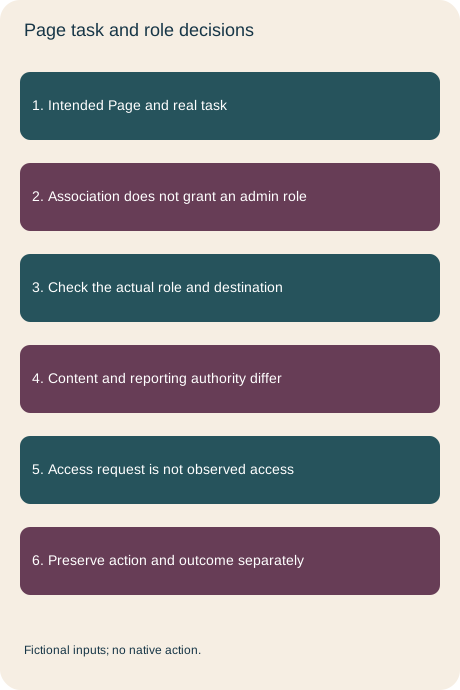
A correct organization destination and an Experience association do not establish current Page-admin access. LinkedIn’s role help distinguishes super admin, content admin, analyst and paid-media roles. Choose the actual next task before deciding which permission matters. A member may have more than one role; a role on another Page still does not establish authority here.
The six supplied cases separate association-only access, a matching content-admin role for a Page post, a content admin proposing the super-admin reporting task, a role read back on the wrong Page, Sponsored Content poster authority borrowed for an ordinary Page post, and an access request with current role still unknown. One supported task is prepared, one role request remains pending and four cases are held. None represents a real grant, post or report.
The role names in the record are abstract checker tokens, not a claim about the exact current menu labels. A supplied matching role supports that bounded task in the exercise; it does not prove a valid real account or guarantee every control. Keep intended access, an actual request, observed role at the exact Page and the separately performed task in different fields. Public association and a familiar organization name cannot replace that readback.
Use the private role record without sharing credentials
The package provides complete bilingual role decisions, private blanks and actual fictional plans/observations. Run python3 check.py with existing Python3; its standard-library rebuild reproduces all named package files. Packaging excludes an unrelated local note instead of collecting every file in the folder. It is still your responsibility to keep real personal notes and evidence private; a reproducible package is not a general redaction tool.
The current official role and association tasks were revalidated in both languages on 2 November 2026. No member account, private Page view, employee record, role request, grant, publishing or reporting action was performed. The earlier create/reuse/hold decisions remain the organization-identity workflow; these records add a separate check before using the resulting access.
Sources & product references
Product details reflect the publication date. External features and interfaces may change.
- LinkedIn: Page creation, platforms and resulting admin role
- LinkedIn: Existing Page and creation troubleshooting
- LinkedIn: actual Page admin roles
- LinkedIn: Adminrollen von Unternehmensseiten
- LinkedIn: Page permission matrix
- LinkedIn: Berechtigungen der Seitenrollen
- Original fictional Page task and role records


