
The short answer
For a self-purchased member Premium subscription, start with the job you still need, the paid capability that completes it and the evidence that you used that capability. Compare the free route before keeping a subscription for a badge or a feature you cannot use. Then identify the original billing channel and inspect renewal and access-end states separately. A decision to cancel, a submitted request and a confirmed renewal change are different outcomes.
What you’ll take away
- A paid feature being available is different from completing a useful task with it.
- The original purchase channel determines the billing route; today’s device does not.
- An active paid period can coexist with renewal off, while trial cancellation has a different access boundary.
Define the next useful job before the next bill
Review an individually purchased member Premium subscription you already have. Organization-managed licenses, Sales Navigator, Recruiter and Premium Company Page need their product-specific instructions. Record its exact plan, responsible owner, billing interval, renewal date and current quote privately. Name one concrete task for the next period, such as inspecting a permitted profile-view trend for an existing content review. “Look more professional” is too vague to tell whether the paid feature helps. This guide does not start a trial, purchase a plan or recommend a universal subscription.
Use a small recent-use record: task, required capability, actual completed use, evidence location, limitation and next need. Separate opening a Premium screen from finishing the task. An unsent message draft or an unused credit allocation is not a completed conversation, customer or return on investment. Keep real business outcomes separate from your feature-use note.
Check the free alternative and the real feature boundary
LinkedIn makes member post, combined and audience analytics available without a separate analytics subscription. If your task is simply to inspect your own post impressions, first check the native owner view. Premium plans have different capabilities; verify the actual plan and account instead of treating every product with Premium in its name as the same entitlement.
A paid capability also has limits. LinkedIn’s current visibility help says Premium cannot reveal the names of members who chose private viewing. Do not renew to solve that unsupported task or change your own disclosure setting just to test someone else. Record the need as unsupported, then choose a different question that the available evidence can answer.
| Required job | Evidence to inspect | Decision boundary |
|---|---|---|
| Read owner post impressions | Actual native member analytics | Do not assume a paid plan is necessary |
| Use a plan-specific permitted insight | Exact entitlement plus a completed useful task | Availability alone does not establish value |
| Identify private-mode profile visitors | Current visibility limitation | Premium does not supply the missing identities |
Trace the original purchase, not the device in your hand
Locate the purchase record and its account before choosing a cancellation route. A subscription bought in a browser on an iPhone can be billed directly by LinkedIn; that is different from an Apple App Store purchase. If the record does not settle the channel, keep the route unknown and inspect the responsible purchase history rather than guessing from the phone model.
Use the linked current channel instructions. For direct purchases, the documented desktop route enters Premium management and the Admin Center purchase record, then the cancellation and final confirmation. Apple purchases have an Apple-device/LinkedIn-app route and linked Apple instructions. Google Play purchases have documented LinkedIn and Google routes. Labels can differ by channel and version; the actual matching subscription and saved result matter more than reproducing a generic button sequence.
| Original purchase evidence | Documented route to inspect | Do not infer |
|---|---|---|
| LinkedIn direct, including iOS mobile web | LinkedIn purchase management; desktop for the iOS-web case | iPhone use means Apple billing |
| Apple App Store | Apple-device LinkedIn flow or linked Apple instructions | A desktop badge confirms Apple renewal status |
| Google Play | The documented LinkedIn or Google Play flow | LinkedIn supplies the Google purchase history |
| Channel unverified | Resolve the purchase record first | A guessed route is a completed cancellation |
Keep renewal, current access and refunds separate
The current cancellation help distinguishes an already paid period, whose access continues to its end after cancellation, from a free trial, whose access stops immediately on cancellation. It asks for cancellation at least one day before the next billing date to avoid another cycle. Read the current terms and exact confirmation for your purchase; do not use the paid-period rule as a promise about a trial.
Before an intended change, preserve only the authorized records your task needs and inspect feature dependencies. Afterwards, reopen the responsible subscription view and record renewal status, access end and the confirmation time. If a request timed out, its outcome stays unknown until read back. An active badge does not by itself mean renewal is still on, and cancellation does not establish a refund or a future payment outcome.
Resolve four complete constructed reviews
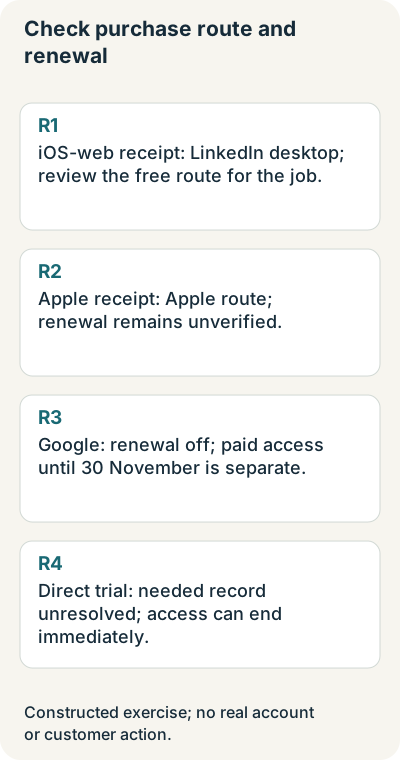
R1 is a fictional owner whose only recorded need is native post impressions. No paid-specific task was completed. The purchase record says iOS mobile web, so the route is LinkedIn desktop, not Apple by device inference. Outcome: reconsider the paid commitment and inspect that route if cancellation is chosen; no cancellation or financial saving is claimed.
R2 has an Apple purchase record and an active badge, but no observed renewal confirmation. Outcome: use the Apple-specific route and leave renewal unresolved. R3 has a Google purchase record with renewal explicitly off and paid access ending on 30 November. Outcome: the fictional cancellation record and continuing access are compatible; neither a refund nor a real charge has been checked.
R4 is a direct free-trial case with a needed record still unpreserved. The current immediate-access-loss rule matters to its plan. Outcome: keep that dependency and the intended billing deadline visible instead of promising access until a paid-period end. All four are teaching inputs, not real subscriber accounts. The packet makes each selected route and unresolved state inspectable.
Finish with a decision and a separately observed account state
Your private record joins the needed job, free alternative, actual paid use, exact plan, original purchase channel, next billing date, selected decision and native confirmation. Keep account identifiers and purchase evidence private. A completed review may reasonably finish with an unresolved channel or an owner decision to gather better evidence; it should not silently default to a purchase.
Primary instructions were read in both languages on 1 November 2026. The exercise performs no purchase, cancellation, message, account closure or refund request. It is an operational review of an existing commitment, not a test of paid features or a claim that the plan caused more reach, readers, customers or revenue.
Sources & product references
Product details reflect the publication date. External features and interfaces may change.
- LinkedIn: Premium cancellation and purchase channels, English
- LinkedIn: Premium kündigen und Kaufwege, Deutsch
- LinkedIn: Apple purchase cancellation, English
- LinkedIn: Apple-Kauf kündigen, Deutsch
- LinkedIn: Google Play cancellation, English
- LinkedIn: Google-Play-Kauf kündigen, Deutsch
- LinkedIn: Free and Premium account scope, English
- LinkedIn: Standard- und Premium-Konten, Deutsch
- LinkedIn: Profile-view privacy limits, English
- LinkedIn: Grenzen der Profilbesuchssichtbarkeit, Deutsch
- LinkedIn: Analytics available to members
- Original commitment and customer-story exercises with editable records


