
The short answer
Start with the exact existing course certificate and its first completion date. Choose separately whether to add it to your profile, add suggested skills, send a course update or enable a certificate share link. The certificate link can be viewed by anyone with it; a restricted update audience does not restrict that separate page. An ordinary Certificate of Completion is not an accredited degree or software certification. Inspect the actual saved entry and file before describing what you shared.
What you’ll take away
- Match the member, course and first completion date before sharing.
- Profile addition, suggested skills, an update and a certificate link are separate choices.
- Turning off a share page does not retrieve previously distributed files.
Identify the existing completion and what it can support
A year-end learning story can name a course you actually completed without turning it into a qualification you did not earn. This guide covers ordinary LinkedIn Learning Certificates of Completion that already exist. Separate professional-certificate products, external licenses, degrees and issuer renewal rules require their own current evidence.
The ordinary completion FAQ says assessments and exercise files are not required for that certificate. LinkedIn can track played videos; the learner remains responsible for completion and understanding. Describe the actual course completion and, separately, an inspectable task you can perform. A profile badge, downloaded certificate or completed video list does not establish a customer implementation or broad software proficiency.
Retrieve the right artifact and preserve its first date
Use the intended existing Learning account and exact course or eligible learning path. The download help offers course/path pages and Learning History, with More and Download certificate; a retired course may require Learning History. Its route names My Content, while the profile-add help uses My Library before Learning History. Follow the current task and offered controls rather than assume one navigation label is universal.
The certificate keeps the first completion date. A later rewatch, download or profile edit does not become a new award date. Keep the download time in a different field. Open the actual file and compare the member, course and date; a similarly named course or another member’s certificate is not the intended source.
Not every object has this certificate: individual videos and collections do not, and the FAQ excludes some continuously updated series. Custom paths not created by LinkedIn lack a downloadable path certificate, while eligible individual courses within them can have certificates. The internal path-completion badge is another object. Current access also depends on the actual eligible entitlement; an unavailable download does not prove no past learning occurred.
Choose profile, skill and update changes separately
For an existing completed course on desktop, the adding help opens Learning History, the course’s More menu and Add to profile. Inspect the confirmation before the final Add to Profile action. It can offer associated skills and a Share with network choice, with Connections or Individuals for the course update. Deselect an unwanted suggested skill rather than silently expand the claim you intended to display.
The mobile help uses My Courses, Learning History, See all and the chosen course’s Add to profile. Its shorter sequence does not establish that every desktop option exists in every app version. Use the actual offered fields. If completion is missing, the source first checks all video checkmarks and refreshes Learning History, then describes cache/cookie troubleshooting; do not mark something complete merely to obtain a certificate.
After an intentional save, reopen the exact profile entry and relevant Learning History state. The documented On your profile indicator can help locate the result, but also compare the actual course and date. Submitted action, saved entry, added skill and delivered update are different observations. The absence of an announcement establishes neither a failed save nor a private entry.
Inspect the separate certificate-link audience
The share FAQ says a connected LinkedIn account is required to create a certificate share link. The certificate’s Share my certificate link setting controls that separate page. Anyone on or off LinkedIn with its link can view it. Choosing Individuals for a course update does not turn a linked certificate page into selected-person-only access.
The share page can include the member’s name, headline and a photo governed by its settings. The certificate itself includes first and last names and the completion date. A reduced public-profile name display does not anonymize a downloaded certificate. Inspect the actual artifact before sending it, and keep real identifying material out of a public exercise.
| Surface | Check separately | Do not infer |
|---|---|---|
| Profile entry | Exact course and saved details | An accredited qualification |
| Course update | Chosen audience and actual delivered state | A restricted certificate-link audience |
| Certificate share page | Link setting and relevant viewing context | Control of a previously downloaded copy |
| Downloaded file | Actual names, date and exact bytes | Anonymity from a profile setting |
Distinguish closing the page from recalling copies
The source says disabling the certificate share link makes that page no longer visible. Inspect that intended page if you deliberately change the setting. It does not claim to recall a previously sent PDF, screenshot, message attachment or a recipient’s copy. Keep page state and known distributed artifacts in separate records.
Sharing a downloaded PDF is an alternative to creating a link, not a way to remove the certificate’s identity fields. Use only the detail needed for the intended professional story. If the required audience cannot be established, retaining the document privately is a complete decision. A certificate link or profile addition is not evidence that anyone read it or that it caused a hiring result.
Work through the complete constructed decisions
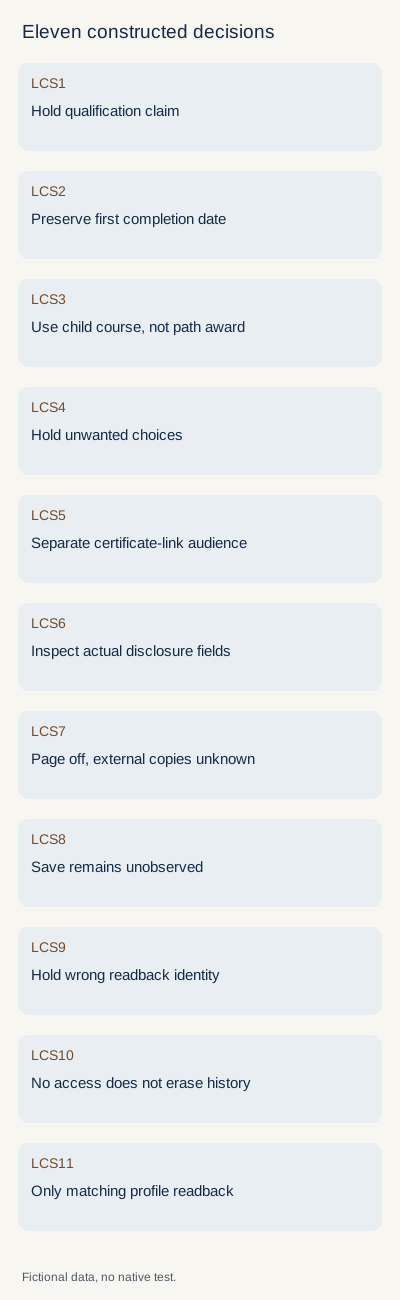
The original packet uses eleven fictional input rows and a separate declaration of sources, plans and supplied observations. LCS1 holds an ordinary completion described as professional software certification. LCS2 holds changing the first completion from 14 March 2025 to the 2 November 2026 download date. LCS3 accepts only an eligible constituent course’s scope when the custom path has no path certificate.
LCS4 holds unwanted skill and update selections. LCS5 holds a selected-individuals privacy claim for a separately enabled certificate link. LCS6 reads an actual plain-text disclosure example containing fictional member and date fields; it is not a real certificate or a PDF. Its identifying bytes remain present despite a declared reduced profile-name setting.
LCS7 keeps an observed page-off fixture separate from a declared earlier distributed file; its bytes are unchanged, and external copies remain uninspected. LCS8 has a submitted add action without readback. LCS9 supplies a wrong-member and wrong-course observation. LCS10 has unavailable current access. None becomes a saved, erased, failed or never-completed claim without the relevant evidence.
LCS11 provides a matching fictional profile readback for the intended ordinary course and first date, with no added skill, update or enabled share page. Its narrow result is that supplied entry state, not a real account action, qualification or reader outcome. The extracted checker rejects meaningful identity, date, scope, duplicate and unsupported-result substitutions. It does not assess arbitrary real credentials or replicate LinkedIn.
Keep a useful private completion-sharing record
Record the course/member reference, ordinary completion scope, first date, actual file identity, desired profile/skill/update/link choices, exact readback context and unresolved access. Preserve source wording and previously distributed copies separately. The blank record needs no password, learner list, recipient collection or private certificate upload.
All eight current primary locale bodies were read on 2 November 2026. The exercise is constructed and runs locally. No course was bought or taken, no private Learning history or certificate was accessed, and no profile, skill, account, link setting or message was changed. These files establish neither native behavior, accredited assessment, human learning, reader preference nor customer value.
Sources & product references
Product details reflect the publication date. External features and interfaces may change.
- LinkedIn: Learning certificate, profile, skill and update choices (en)
- LinkedIn: Learning certificate, profile, skill and update choices (de)
- LinkedIn: Ordinary completion certificate scope and eligibility (en)
- LinkedIn: Ordinary completion certificate scope and eligibility (de)
- LinkedIn: Download, custom paths and first completion date (en)
- LinkedIn: Download, custom paths and first completion date (de)
- LinkedIn: Certificate link audience, disclosed fields and link-off scope (en)
- LinkedIn: Certificate link audience, disclosed fields and link-off scope (de)
- Original constructed certificate-sharing cases, exact disclosure bytes and standard-library checker


