
The short answer
Adding a Career Break is optional. Choose the period and wording you actually want members to see, then use the dedicated Add career break route rather than inventing an employer or position. Reopen the intended entry after saving and inspect its text and dates. LinkedIn says your network is not notified when you add a break; that does not make the entry private or prove that every edit has the same notification behavior.
What you’ll take away
- A break entry and its type are optional; unnecessary personal detail can remain omitted.
- Use the actual break object; an employment row and Open to Work are different tasks.
- Check saved wording and viewing context; no announcement is not evidence of secrecy.
Decide whether a break entry helps the story you want to tell
A professional recap may leave a period that you want to explain without treating it as paid work. Begin with your own purpose: give useful context, correct a misleading chronology or leave the profile unchanged. A gap does not oblige you to publish a reason, and this guide does not infer a health condition, caregiving role or career intention from dates.
Write only the wording you are comfortable placing in the intended member-visible context. You can keep a type unselected under the current help instead of forcing a personal category. A neutral description still needs to be true. If the audience you require cannot be established, withholding the entry is a complete deliberate decision, not a failed profile.
Keep the break separate from employment and availability
LinkedIn has a dedicated Career Break entry within Experience. Its separate unemployment/retirement help recommends headline or summary wording for a current status and warns against using employment Experience for that announcement. Read the objects together: the dedicated break feature exists, while a fake employer or job is not a way to fill an interval.
Use a genuine position for actual professional work and the availability controls for a job-search audience. Do not change a supported employment end date merely to make the break look tidy. Two real activities may overlap; the exercise does not impose an invented rule that every profile interval must be adjacent or that all overlaps are errors.
The older status page is not evidence that the dedicated break route has been retired. Conversely, the existence of a break field does not verify the reason, approve an employer association or establish a skill gained during the period. Keep dates, description and any separate work claim tied to the evidence you actually have.
Use the dedicated route and reopen the intended object
The current desktop help starts with Me, View profile, Add profile section, Core and Add career break. Mobile uses the profile, Add section and the Career Break choice under Core. Enter the intended information through the actual offered fields and save deliberately. Labels can vary; an employment Add position form is not the same object.
After saving, reopen the intended break and compare the period and full wording with your plan. An open form or a submitted save is not that readback. If the entry or control cannot be found, keep its state unresolved rather than saving repeated guessed copies. Review any actual language edition separately; do not borrow every position-specific synchronization rule for this object.
Distinguish member visibility from the specific notification statement
The break help describes the entry as optional and visible to signed-in members. It separately says the network is not notified when a break is added. Keep that statement limited to its documented action; it is not a selected-reviewer access lock or a promise that all later edits and deletions are silent.
A quiet notification inbox does not show who can read a profile or who already saw its former text. Public-profile controls, member viewing context and old exports remain separate checks. Do not publish extra personal detail because a no-notification sentence sounds like confidentiality, and do not promise a recruiter response or hiring benefit from adding the entry.
Edit or remove the break you actually intend
The documented maintenance route returns to Experience and the Edit control beside the intended break. Editing has its own Save; removal uses Delete experience and confirmation. The generic delete label does not identify the selected item. Inspect the actual break reference before a deliberate removal so a real employment position is not the unintended target.
A changed entry does not rewrite an old profile PDF or recall an earlier screenshot. Keep needed authorized source text privately before removal, and inspect the actual remaining entry/list afterward. No deletion, employment correction or account operation is performed in this guide.
Work through eight constructed break decisions
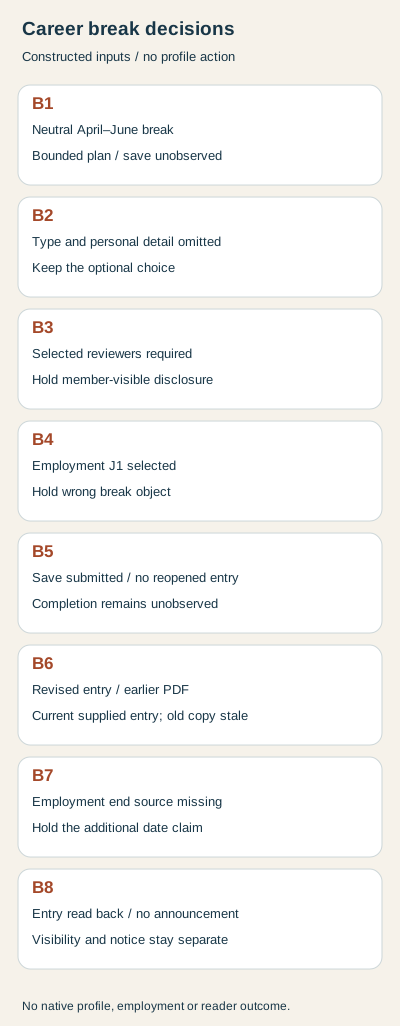
B1 supplies an April–June 2025 break and a neutral declared description. Decision: a bounded entry plan is ready, with save unobserved and no invented employer. B2 deliberately leaves the type and personal detail blank. Decision: preserve that choice rather than fabricate a reason. Neither fictional case is evidence of a real career history.
B3 requires access only for selected reviewers, but its proposed member-visible entry cannot establish that restriction. Decision: hold disclosure. B4 targets employment J1 while the intended object is break B1. Decision: hold wrong-object removal despite the generic Delete experience label.
B5 supplies a submitted save but no reopened entry. Decision: completion remains unknown. B6 supplies a reopened revised break alongside an older exported copy. Decision: record the current supplied entry and the stale copy separately, without claiming the export updated or was recalled.
B7 proposes an employment end date whose source is missing. Decision: hold the factual chronology instead of deriving it from the desired break. B8 supplies a reopened member-visible entry and no observed announcement. Decision: keep the entry observation and the specific add-notification guidance separate; neither privacy nor a hiring result follows.
Rebuild the records before using the private entry worksheet
The shared download contains eight break CSV cases, declared source facts, independent supplied observations, complete English/German decisions and a private blank record. With existing Python 3, extract the ZIP and run python3 check.py. The standard-library rebuild reproduces decisions and localized diagrams without accessing LinkedIn or a profile.
The checker rejects duplicate IDs, wrong member/object references, stale or mismatched saved observations and unsupported privacy, notification, hiring or old-copy recall claims. Keep real references and any sensitive context private. Current public help was read separately in both languages on 2 November 2026; the records are constructed and establish no native test, reader preference or customer result.
Sources & product references
Product details reflect the publication date. External features and interfaces may change.
- LinkedIn: Dedicated Career Break route and visibility (en)
- LinkedIn: Berufliche Auszeiten und Sichtbarkeit (de)
- LinkedIn: Professional positions, organization scope and secondary languages (en)
- LinkedIn: Professional positions, organization scope and secondary languages (de)
- LinkedIn: Employment end dates versus status announcements (en)
- LinkedIn: Employment end dates versus status announcements (de)
- LinkedIn: Separate profile section types (en)
- LinkedIn: Separate profile section types (de)
- Original constructed profile-history records, complete bilingual decisions and standard-library rebuild


