
The short answer
Identify the exact professional position and the organization it actually belongs to before changing Experience. Match role, dates and current status to supported facts, inspect any Update my headline choice, and save the intended entry deliberately. Reopen it afterward and review other language versions separately. Using an organization’s product is not employment there, and a primary-language save does not prove every edition or exported profile changed.
What you’ll take away
- A professional association needs actual work; being a customer is insufficient.
- Dates, current status, headline and outgoing announcements are separate decisions.
- Reopen the exact position and each affected locale; keep old exports separate.
Choose the position before choosing a more impressive title
A recap can expose an old current-role label or a contribution that the profile describes too broadly. Start with the actual work, member account, position reference and organization. Keep the contribution and dates beside the proposed correction. A matching company name or logo does not decide which organization the work belonged to.
LinkedIn’s position help requires genuine, accurately labeled professional associations. Its examples include employment, contract work, internships, volunteering and board service; product use or being a customer is insufficient. Describe the relationship you actually had rather than attaching a familiar employer badge to a personal project.
Preserve the period and the scale of the work
Write a minimal private fact record: organization, relationship, role, period, current state and a bounded contribution. A local supporting note is evidence only of what it contains; it is not employer verification or permission to disclose a client project. If a date or role is unknown, hold that correction rather than filling the form with a plausible credential.
When a role has ended, the status help says to update its end date and turn off I currently work here, then save. Use the true end point rather than today’s date by default. Independent professional activities can overlap, and month-level information must not be silently expanded into an exact day. A career break and job availability have their own controls.
A source that says contributed to a documentation review cannot support a translation saying led the whole organization’s transformation. Keep the scope of the actual work visible even when shortening a title. Dates and role facts should agree across a profile, its chosen headline and any later recap text.
Inspect the offered position form and its additional choices
To add a position, the desktop help opens Me, View profile, Add profile section, Core and Add position. Existing positions are edited from Experience; the desktop guidance also names Show all experiences. Mobile uses the profile’s Experience add/edit controls. Select the intended position rather than a career-break row with a similar generic edit label.
Read the actual fields and any Update my headline selection before saving. That optional choice can change introduction wording and is not a required proof that the position itself saved. Keep the intended headline in the review when the goal is only a date correction. If an unexpected prompt or unavailable control appears, leave the outcome unresolved instead of trying unrelated account changes.
The position help also says Notify Network may inform the network when enabled. Actual outgoing preferences, generated announcements and profile visibility are separate states. Use the existing announcement guide for that scope; do not repeatedly create or delete positions to produce a desired notification.
Read the saved position and each affected language
After the deliberate save, reopen the same position in the intended language. Compare organization, role, period, current status and contribution with the fact record. An open edit form, a saved headline or an absent announcement does not substitute for that entry readback. A different position with similar wording is the wrong observation.
The current Experience help explicitly says secondary-language positions do not automatically reflect English-profile changes and need manual updates. Inspect each relevant actual version rather than inheriting the primary result. A previously exported PDF is another artifact with its own source and observation time; it does not update merely because the live entry changed.
Resolve eight constructed position corrections
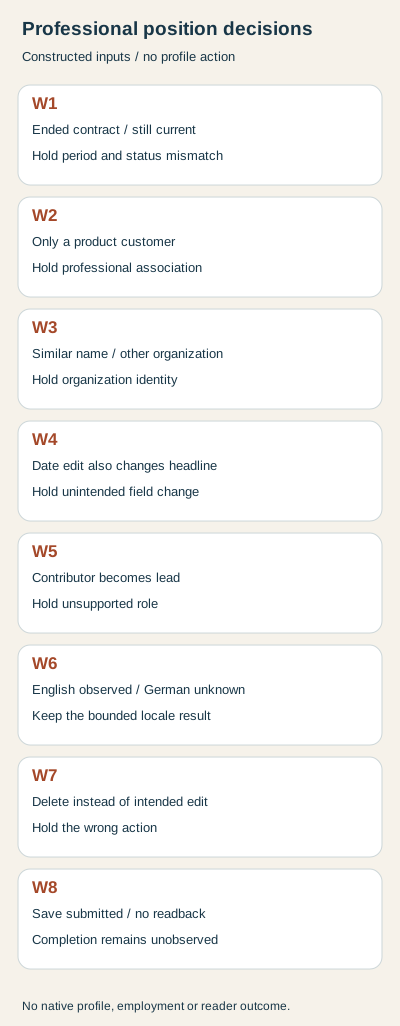
W1 supplies a contract that ended in September 2026 while the proposed entry remains current. Decision: hold the period/current state mismatch. W2 supplies only product-customer status. Decision: hold the unsupported professional association. W3 chooses another organization’s reference despite a familiar name. Decision: hold identity.
W4 supplies a date-only correction whose proposed form also changes the headline the plan was meant to retain. Decision: hold that unintended field change. W5 preserves the dates but changes contributor to lead in the German candidate. Decision: hold the role mismatch rather than accepting fluent stronger wording.
W6 supplies a matching reopened English position while the German readback is unknown. Decision: record the bounded English observation only; the other edition remains unverified. W7 changes the requested edit into deletion. Decision: hold the wrong action before losing the intended row.
W8 supplies an exact proposed entry with save submitted but no reopened observation. Decision: the plan is bounded while completion is unobserved. These eight records are independent teaching inputs for fictional member P1, not employment histories, employer approvals or profile operations.
Execute the fact-to-entry checks and keep a private record
The shared packet supplies eight position CSV rows, source facts, candidate fields, independent observations, complete bilingual decisions and a blank position worksheet. Extract with existing Python 3 and run python3 check.py. The rebuild compares the declared facts and references; it neither authenticates a career nor opens a LinkedIn editor.
Invalid month values, reversed intervals, duplicate case IDs, wrong member/organization/entry, unsupported role/current state, unintended headline/deletion and mismatched saved observations are rejected or held explicitly. No private employment document, profile, verification, notification or account action was accessed. Current English/German primary bodies were separately read on 2 November 2026. This work establishes no hiring, reader or customer result.
Sources & product references
Product details reflect the publication date. External features and interfaces may change.
- LinkedIn: Professional positions, organization scope and secondary languages (en)
- LinkedIn: Professional positions, organization scope and secondary languages (de)
- LinkedIn: Employment end dates versus status announcements (en)
- LinkedIn: Employment end dates versus status announcements (de)
- LinkedIn: Separate profile section types (en)
- LinkedIn: Separate profile section types (de)
- Original constructed profile-history records, complete bilingual decisions and standard-library rebuild


