
The short answer
Add an owned address in the account’s Email addresses settings and confirm it through the official flow. Only a verified replacement can become primary. Select Make primary, then reopen the list and inspect the actual primary entry before considering removal of the old one. Additional addresses can also be sign-in routes. A sent confirmation, changed contact card or license toggle does not prove that this account change finished.
What you’ll take away
- Confirmation, primary selection and old-address removal are separate checks.
- Keep a working authorized access route while the replacement is unverified.
- Email display, exports, notification delivery and license activation need their own evidence.
Identify the account and the access you intend to keep
A former work mailbox can stop being available while your member account still administers a Page or holds the source behind a recap. Begin with the actual signed-in member, current primary address and a replacement you own and can receive mail at. Keep a working authorized session while reviewing the change; do not sign out everywhere simply to produce a test.
This task changes an account email. The contact-card guide handles public contact details and email display/export choices, the security guide handles two-factor devices, and the recovery guide handles lost access. A second confirmed email can belong to the same member account. You do not need another profile or a public address in About to maintain the login route.
Add and confirm before selecting a new primary
The current help opens Me, Settings & Privacy, Sign in & security and Email addresses under Account access. Add the intended owned address and follow the actual security prompts. LinkedIn may request the account password, a code to the current primary address or approval in its app. Complete those checks only in the official account context; keep passwords and codes out of any worksheet.
Then follow the confirmation in your own mailbox. The help requires a verified replacement before it can become primary. A typed address, submitted add form or sent verification notice is not confirmed ownership. Reopen the email list and inspect the confirmation state rather than repeatedly requesting mail. Primary and additional addresses can both be sign-in addresses according to the management help.
Read back the primary before considering removal
Use Make primary beside the verified replacement, complete any actual security check and reopen Email addresses. Record which entry now carries the primary role. The primary selection concerns the account’s notification address; it does not itself remove the old additional address or demonstrate an actual notification delivery, fresh sign-in or account-wide security audit.
To remove an old primary, the removal help requires first making a secondary address the new primary. Only then does the old entry’s Remove option appear. Inspect the remaining owned addresses and observed removal separately. Do not delete a still-working route before the replacement has been confirmed and its intended primary state observed. If the result is uncertain, preserve access and inspect instead of repeating an operation blindly.
The management help also describes an optional toggle beside a recently confirmed email when activating a product license, such as Sales Navigator. Treat that displayed product requirement separately. The source says switching it on does not trigger a password reset; an observed toggle alone is not evidence that a license activated, a publishing role was granted or the primary address changed.
Keep an email conflict separate from identity and visibility
An already-registered notice can involve an existing own account, a mistaken Join now route, a recycled employer address or the documented Gmail canonical-address case. It does not establish ownership of another profile. Do not strip dots from every company address or try to reset a stranger’s account. Use the official sign-in/support branch for the actual situation; a suspected recycled address can remain unavailable.
The verification help says a sole bounced email can require the official identity-recovery route. Follow that route’s current prompts and data choices if it applies, without putting identity documents in this record. Email visibility and inclusion in connections’ exports remain separate settings. After a deliberate primary change, inspect the intended display/export scope and separately published copies; changing a login reference does not recall old mail, exports or text.
Resolve eight constructed email decisions
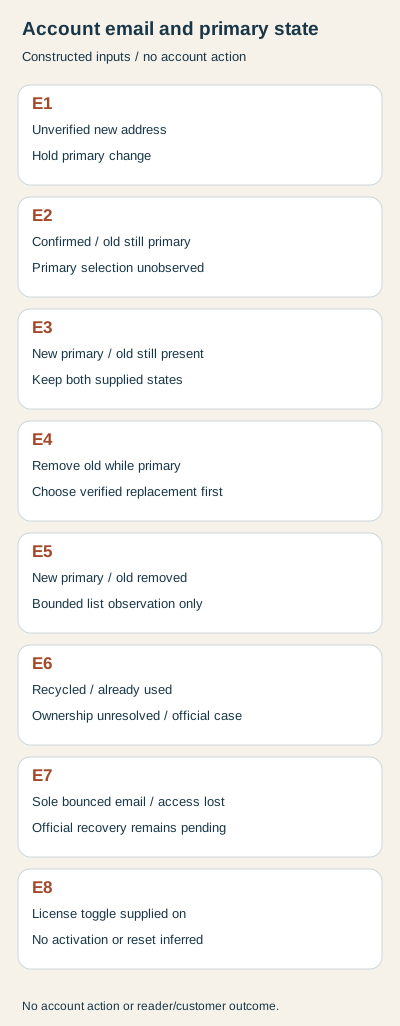
E1 supplies a new address entered but unverified: hold the primary change. E2 supplies a verified replacement while the old entry is still primary: confirmation is complete, primary selection unobserved. E3 supplies the new entry as primary while the old entry remains attached: retain both facts rather than inventing removal.
E4 proposes removing the old entry while it is still primary: first resolve the required replacement. E5 supplies a verified new primary and an observed old-entry removal: record only that bounded list state, with old copies and actual delivery unknown. These independent snapshots are teaching inputs, not a recorded sequence in a real account.
E6 supplies an already-used recycled address with ownership unresolved: hold the addition and use the official case route. E7 supplies a sole bounced address and lost access: choose recovery rather than claiming another verification request restored access. E8 supplies an optional license toggle switched on: keep activation unknown and do not infer a password reset or primary change.
Rebuild the records before making a private change plan
The download provides eight actual CSV inputs, full English/German decisions, a blank email record and standard-library Python source. Extract with Python 3 already available and run python3 check.py. The rebuild reproduces results and localized diagrams without a mailbox, network request or LinkedIn login. Address references are opaque fictional labels, not deliverable addresses.
The checker rejects duplicate cases, mismatched member references, a claimed primary change without its supplied observation and unsupported removal, delivery, password-reset or activation claims. Use the private record for masked address references, ownership/access, confirmation, intended action, primary/list readback and remaining uncertainty. No account setting, mailbox, verification message, license or recovery submission was accessed for this guide; public sources were reviewed in both languages on 2 November 2026.
Sources & product references
Product details reflect the publication date. External features and interfaces may change.
- LinkedIn: Managing account email and primary selection (en)
- LinkedIn: Managing account email and primary selection (de)
- LinkedIn: Email confirmation and bounced sole address (en)
- LinkedIn: Email confirmation and bounced sole address (de)
- LinkedIn: Removing an address after primary replacement (en)
- LinkedIn: Removing an address after primary replacement (de)
- LinkedIn: Already-registered and recycled addresses (en)
- LinkedIn: Already-registered and recycled addresses (de)
- LinkedIn: Official identity-recovery data choices (en)
- LinkedIn: Official identity-recovery data choices (de)
- LinkedIn: Separate email visibility and export inclusion (en)
- LinkedIn: Separate email visibility and export inclusion (de)
- Original constructed email and duplicate-account decisions, source and private records


