
The short answer
Inspect the intended account’s current two-factor method and recovery access before changing phones or authentication settings. Follow the official Sign in & security flow and verify the configured method. Keep secrets and codes out of worksheets; a successful setup is an access-control observation, not proof that every takeover risk is removed.
What you’ll take away
- An authenticator setup belongs to a particular device/app installation.
- Keep a working authorized recovery route while changing devices.
- Specialized LinkedIn products can require two-factor authentication.
Protect the actual publishing identity
Identify the member account that administers your Page or publishes your work. A Page has authorized member roles; it is not a shared login to distribute among collaborators. Keep the responsible identity and recovery route clear before a device change, especially when a scheduled publication depends on that access.
Read the current method without changing it merely to make a checklist complete. A phone number, authenticator entry and active session are different access components. A screenshot containing a setup secret or one-time code is not useful public evidence and does not belong in a recap or worksheet.
Use the actual official setup flow
The help opens Settings & Privacy, Sign in & security and Two-factor authentication, with app or SMS methods. It describes password/email/app checks that may precede setup. Use the actual account prompts; do not forward a code or setup secret to an editor, support impersonator or public form.
LinkedIn recommends an authenticator app in its overview, but availability and a recoverable setup still need inspection. The current help also makes two-factor authentication a condition for Recruiter, Campaign Manager and Sales Navigator access. Disabling it as a quick workaround can affect those products.
Review the device transition before removing the old setup
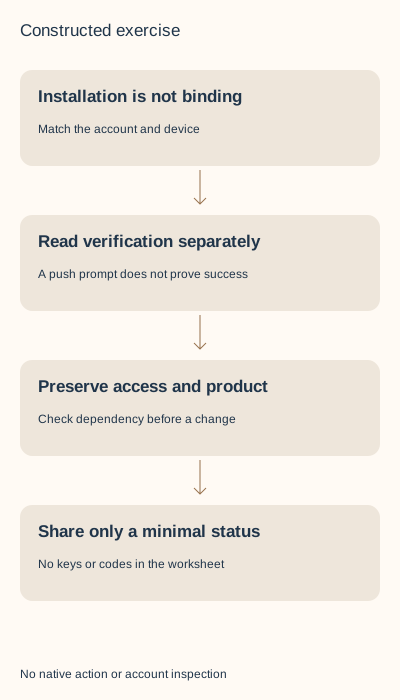
The authenticator help says its connection is unique to the device and app installation. A new phone, reinstall or reset can require setup again. Do not infer that copying an app icon or cloud photo reproduces the actual authentication entry. Keep the current authorized access route while checking the transition.
If access is already lost, use the official recovery branch rather than repeatedly changing unrelated preferences. Record the issue and available route without storing a real code. A new device receiving a prompt is not evidence that every old session ended or all unauthorized access was removed.
Resolve three access-control decisions
S1 — Constructed new phone: the app was installed, but no account entry has been verified. Decision: keep the existing access route and complete the official setup/readback deliberately. Result: setup pending, not a verified migration; no secret is copied into the record.
S2 — Constructed product dependency: a member plans to disable two-factor authentication while retaining Sales Navigator access. Decision: read the documented dependency before changing it and resolve the actual access problem through the supported route. Result: a held workaround, not an unexplained product failure.
S3 — Constructed public proof: a draft screenshot contains a setup key and code. Decision: omit that screenshot and describe the checked status without secrets. Result: a safe teaching record; no claim that an exposed real key has been revoked or that the account is now fully secure.
Verify a bounded outcome without locking yourself out
Inspect the saved authentication method and any actual successful authorized verification. Do not log out of every working session merely to produce evidence. Where the result is uncertain, preserve the working access and current state while following official troubleshooting.
Keep account security and authorization of outside services separate. A two-factor setup does not review every connected application or Page role. Use the service-exit or Page-access workflow for those boundaries, with the same exact identity and no shared password.
Record status without secrets
The worksheet holds account role, method label, device transition, recovery-route status and observed check time. It has no field for passwords, seed keys, recovery documents or one-time codes. Keep the completed note private.
Sources were read on 1 November 2026. The cases are constructed; no authentication setting, device, session or account was changed. This is a recoverable setup review, not a security audit or guarantee against compromise.
Execute seven separate setup and access decisions
T1 supplies an installed app without a verified account/installation binding: setup remains unverified. T2 supplies a matching new-device verification while working access is unknown and asks to retire the old route. Our planning safeguard holds that retirement. It is not an observed native rejection or a claim that LinkedIn supports two simultaneous authenticator bindings.
T3 supplies matching new verification but claims old member sessions ended; keep that unsupported inference open. T4 proposes disabling two-factor authentication while retaining Sales Navigator access and is held against the current product dependency. The authenticator troubleshooting page describes disabling/re-enabling from a working session for particular setup problems. It does not remove that dependency or justify a blanket reset.
T5 reads an actual fictional source record containing explicit nonfunctional key/code placeholders. The generated text exports only method, new-verification status, product access and old-session status. The placeholders and device reference are omitted. This is a fixed status projection, not a tool for uploading or redacting real secrets. T6 supplies a push prompt without successful verification; T7 supplies a verification matching the declared member, device, installation and method. Preserve the different states without inventing future access or complete account security.
Use the actual status files and a private device record
The shared download contains seven device/setup rows and eight separate session rows, complete bilingual decisions, a blank device record and two actual minimal-status text files. Extract with an existing Python 3 and run python3 check.py. It reproduces the supplied states and four localized diagrams without a network request or account operation. Wrong account/device/installation, invalid timestamps, unsupported verification and crossed session outcomes are rejected.
The blank record has method, intended device/installation reference, working-access/recovery status, product dependency, actually offered setup, separate verification and unresolved old access. It has no field for passwords, seeds or one-time codes. Current primary bodies were checked in both languages on 2 November 2026. The original guide and cover are retained; this constructed extension adds no topic, formal research piece, distinct aid type, native device test, reader preference or customer evidence.
Sources & product references
Product details reflect the publication date. External features and interfaces may change.
- LinkedIn: Current two-factor setup and product dependencies
- LinkedIn: Two-factor overview
- LinkedIn: Device/install-specific authenticator setup
- LinkedIn: Current member access boundary (a1339362,en)
- LinkedIn: Current member access boundary (a1339362,de)
- LinkedIn: Current member access boundary (a1381088,de)
- LinkedIn: Current member access boundary (a521848,en)
- LinkedIn: Current member access boundary (a521848,de)
- LinkedIn: Current member access boundary (a1354987,de)
- LinkedIn: Current member access boundary (a1356903,de)
- Original constructed device and session records


