
The short answer
Use the intended member account’s Phone numbers settings to add and confirm an owned replacement through the actually offered security flow. Check which verified number is selected for password-reset use, then inspect the later list before considering the old entry’s removal. Keep profile Contact info, SMS two-factor dependencies and the separately documented no-email-account branch apart. A sent code or submitted removal does not prove the intended account state.
What you’ll take away
- Number ownership confirmation and reset-use selection are different observations.
- Only one mobile number at a time is selected for sign-in problems under the current help.
- Keep working access and actual two-factor/product dependencies clear before retiring the old number.
Choose the account-number job, not a public contact edit
A member who administers a Page or prepares a recap may be changing the mobile number they can keep using. Start with that exact member account, a replacement they own and the current authorized access route. A Page has member administrators; it is not another shared phone login. Keep a working session while reviewing the change instead of signing out everywhere merely to demonstrate a result.
Phone numbers under Sign in & security concern the account. The profile’s Contact info is a separate display object, and an authenticator installation or active member session has another purpose. The account-number help says numbers added there do not appear on the profile. That does not inspect a separately published contact card, other discovery settings or copies already held elsewhere.
Follow the offered add-and-confirm sequence
The current desktop task opens Me, Settings & Privacy, Sign in & security and Phone numbers under Account access. Add phone number first asks for the verification sent to the primary email; then choose the country and enter the owned number. The current mobile task reaches the same account area but allows an initial primary-email or phone challenge. Use the actual offered account prompts rather than promise an identical entry sequence on every device.
Send code requests the ownership SMS. The task then describes possible password, email or app checks, Done and a later Confirm step for the received code. It also documents resend/call options. They are options for an intentional account operation, not instructions to send repeated requests when the result is unknown. A typed number, submitted request or completed intermediate dialog is not the later verified-number state. No real code belongs in the worksheet.
Inspect the single reset-use choice separately
The help says adding the first mobile number automatically enables it for password-reset purpose. It also requires number verification before password-reset use. Preserve both statements: automatic purpose enablement is not evidence of ownership confirmation, a successful reset or a new sign-in. When replacing an existing number, inspect which entry is actually selected instead of assuming that confirmation moved that role.
Desktop uses the Use for password reset checkbox; the mobile task uses Use for resetting password and explicitly requires the LinkedIn password for that change. Only one mobile number at a time can be used for sign-in problems under this task. Reopen the intended account’s number list and compare the chosen verified entry with the plan. A second attached number and a selected reset number are different facts.
| Question | Relevant supplied or actual state | Keep separate |
|---|---|---|
| Was the replacement entered? | Add request and exact intended number reference | SMS ownership confirmation |
| Is it verified? | Matching confirmation/list state | The selected reset-use role |
| Which number is used for sign-in problems? | The single reset-use choice in this account | A real password reset or successful future access |
| Is the old entry gone? | A later matching number list | Profile Contact info, other copies and sessions |
Resolve factor dependencies before retiring an old route
The number-removal task uses Remove on desktop and the removal icon in the mobile number box, with its actual security checks. It also says a number used to establish two-factor authentication may not be removable until two-factor is disabled. Read that dependency together with the separate product help: Recruiter, Campaign Manager and Sales Navigator require two-factor access. Do not turn the removal note into an automatic instruction to disable protection while continuing to rely on those products.
Keep the existing authorized access and decide the actual supported method/device transition separately when that dependency applies. The security guide covers that review. Our exercise holds retirement when working access or the replacement selection is unresolved; that is our planning safeguard, not an observed native rejection. After a deliberate authorized removal, inspect the later number list. Without it, the request stays submitted or unknown and should not be blindly repeated.
Use the no-email branch only for the account it describes
The official task for member accounts with no associated email is currently served under Marketing Solutions Help. Its substantive body covers an existing phone-only member account with a new number. After confirming the replacement, it gives Make primary and then old-number removal, with separate desktop, iOS and Android instructions. Preserve that stated branch and source context; it is not evidence that every ordinary account offers a Make primary phone button.
The standard account task instead describes reset-use selection. Inspect the account context and actually offered control. If access is lost, a required challenge is unavailable or a control cannot be found, keep the state unresolved and use the appropriate official access/recovery task. Do not create another member identity, request someone else’s code or claim the older no-email wording guarantees a current universal interface.
- Identify the exact member, owned replacement and working authorized access.
- Read the standard or explicitly applicable no-email task and actual offered controls.
- Add and confirm deliberately; record number verification separately.
- Inspect the intended reset-use or branch-specific primary selection.
- Resolve any SMS two-factor/product dependency before intentional old-number retirement.
- Reopen the same account list and preserve the actual outcome or uncertainty.
Resolve twelve independent number-change states
The packet’s P1 supplies another member and is held. P2 supplies a submitted code request without later confirmation; ownership and reset use remain unresolved. P3 supplies a verified replacement while the old number remains selected. P4 supplies the replacement selected with the old entry still present. Those last two snapshots answer different questions; neither proves a password reset or removal.
P5 requests retirement with working access unknown and is held by our planning safeguard. P6 proposes automatic two-factor-off/removal while retaining a dependent product; hold the workaround. P7 changes Contact info and claims an account-list outcome. P8 borrows Make primary into the standard branch. These are scope mistakes, not native account tests.
P9 is explicitly the no-email branch, with a confirmed replacement and submitted primary request but no later list. P10 supplies an old-number removal request without readback. P11 supplies the matching replacement selection and an absent old entry: record that bounded list only. P12 supplies lost access rather than a completed change. All twelve states are fictional, independent inputs rather than a recorded sequence or a successful recovery claim.
Use the actual local plans and private record
The download has twelve CSV plans, twelve independent supplied observations, declared source contexts, complete English/German decisions, a private blank and two localized diagrams. Four actual TXT plans distinguish r1’s old target from reviewed r2’s replacement. MEMBER_A, PHONE_NEW and DE are our teaching references, not real phone numbers, native identifiers or guaranteed menu labels. The files are planning text, not native upload files.
With Python 3 already installed, extract and run python3 -B check.py. The standard-library rebuild reproduces all files and ZIP in the recorded environment without installation, network or account actions. Meaningful invalid-input checks cover wrong member/object/branch/country, target, stale file/observation, missing verification and unsupported outcome substitutions. This is a closed known-input checker, not a service for uploading, redacting or certifying arbitrary personal data.
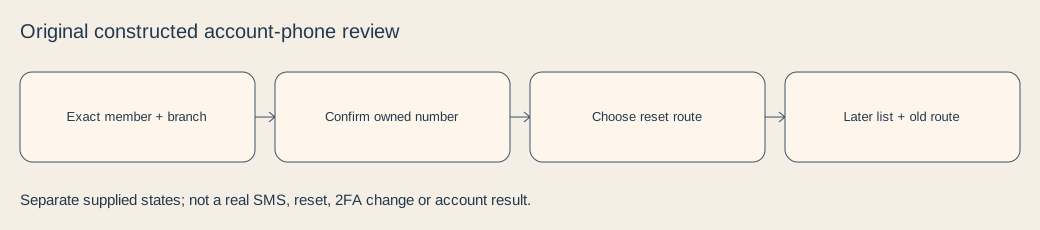
Finish with a bounded account state
The private record separates source version, masked number references, country, offered operation, working access, verification, reset-use selection, old entry and later readback time. It has no field for actual numbers, passwords, codes, seeds or identity documents. Keep actual profile contact details, sessions, copies, delivery and password-reset results unresolved unless each was separately observed.
Current primary bodies were checked on 3 November 2026. No private phone, profile, mailbox, SMS, call, code, two-factor setting, account, support request or recipient was accessed or changed for this guide. These authored records add neither a formal research piece nor another aid type. A matching local plan or supplied list does not establish real-world access, reader preference or customer value.
Sources & product references
Product details reflect the publication date. External features and interfaces may change.
- LinkedIn: Account mobile numbers and reset-use selection (en)
- LinkedIn: Account mobile numbers and reset-use selection (de)
- LinkedIn: Number confirmation versus profile display (en)
- LinkedIn: Number confirmation versus profile display (de)
- LinkedIn: Separate profile Contact info (en)
- LinkedIn: Separate profile Contact info (de)
- LinkedIn: Member accounts without an associated email,served by Marketing Solutions Help (en)
- LinkedIn: Member accounts without an associated email,served by Marketing Solutions Help (de)
- LinkedIn: Separate two-factor setup and product dependencies (en)
- LinkedIn: Separate two-factor setup and product dependencies (de)
- Original constructed number-change records,source and private blanks


