
The short answer
Identify the information that must survive before choosing a new shape. Fill crops content; fit preserves the whole frame with space around it; recomposition changes the layout. Calculate the proposed window, then inspect the entire timeline and final viewing context. An attractive thumbnail does not establish that later labels, controls or captions remain visible.
What you’ll take away
- State pixel shape and rotation assumptions before doing aspect-ratio arithmetic.
- A centered crop can remove the axis needed to interpret a chart.
- Interface overlays and moving content require actual playback checks.
Name the information the viewer must retain
A recap may contain a wide chart, a screen-recorded control and a caption near the bottom. List which labels, values and changes carry the explanation. A decorative edge can be expendable; the denominator or date range often cannot. Do not decide only from the opening frame when the useful action happens later.
Our constructed example starts with a 1920 × 1080 source and a proposed 960 × 1200 output. Assume square pixels and no rotation. These numbers describe a planning exercise, not a prescribed LinkedIn size or an actual creator recording. Different pixel shape or rotation needs a corrected display-geometry calculation.
Calculate what fill and fit actually keep
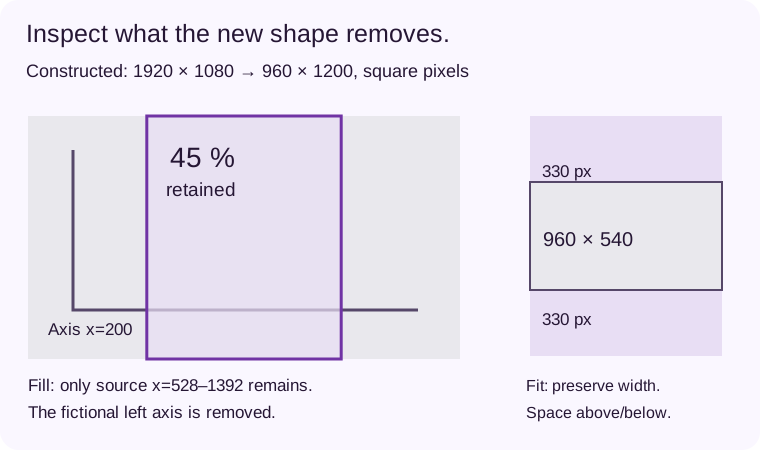
To fill the target’s height, scale by 1200/1080. The target then retains only 864 source pixels horizontally: between crop edges x=528 and x=1392 (right edge excluded for pixel columns). That is 45% of the original width. A fictional axis at source x=200 is outside the retained window, even though the resulting portrait frame looks full.
To fit the entire source instead, scale by one half. The image becomes 960 × 540 inside the 960 × 1200 target, leaving 330 pixels above and below. The full width survives but the picture occupies less vertical space. Those are exact ideal dimensions for this example; the actual editor, pixel rounding and export still need checking.
| Choice | Worked geometry | Information consequence |
|---|---|---|
| Centered fill | Source x=528–1392; width 864 | Keeps 45% of source width; axis x=200 is lost |
| Fit the entire frame | 960 × 540; 330 px above/below | Retains full source; central content is smaller |
| Recompose | Move required labels into a new layout | Can preserve meaning without keeping every original position |
Choose between space, cropping and a new layout
If the full chart is required, a fit can be more honest than a tight crop. Use the extra area deliberately for a short title or clear context, without repeating the whole narration. If the central action is self-contained and no needed text leaves the crop, filling may meet the task. Keep that decision tied to the specific content.
When neither version is readable, recompose the explanation rather than shrinking everything indefinitely. Rebuild the chart with its axis and source label, record the important control at a suitable scale, or split the sequence. Changing the layout is additional production work, so preserve the original and verify that the new arrangement has not changed the claim.
Review the crop across the moving timeline
Inspect the moment a cursor moves to an edge, a menu opens or a new number appears. Confirm that a person can still follow the sequence without your private explanation. A crop that passes at second zero may remove the action at second ten. Review every meaningful transition and the ending in the final export.
Check captions and visual descriptions after reframing. A caption can cover a chart that used to sit higher, and a description can refer to a visual relationship that no longer exists. Keep essential information away from likely controls, then verify the actual destination’s interface instead of inventing one permanent pixel-safe rectangle.
Check the displayed shape and the real interface
Read the export’s stored dimensions, display shape and any rotation metadata, then open it in a player. A 1920 × 1080 matrix with a rotation instruction is not necessarily a landscape presentation. Our example’s simple width/height calculation assumes none of those additional transformations.
LinkedIn’s current help gives an allowed aspect-ratio range and says to keep key material away from the edges because the interface can overlap it. It does not make this article’s target a universal optimum. Inspect a practical small view, a larger view and the processed post after any actual publication.
Finish with a decision someone else can repeat
For the fictional chart, record: the centered crop loses the required axis; fit retains the complete source with 330 pixels above and below; a new portrait composition remains an option if fit is too small. Keep the source bounds and the reason for rejecting the crop alongside the chosen export.
Save the revised layout, final file identity and matching caption/description versions. A successful shape conversion establishes a geometry change, not comprehension, accessibility or better engagement. Test the actual explanation with relevant viewers when possible and record their real feedback separately.
Sources & product references
Product details reflect the publication date. External features and interfaces may change.


