
The short answer
Open the intended member account’s Where you’re signed in settings and match the particular old session you actually intend to end. Keep individual sign-out separate from the documented action for all other sessions, which excludes the current one. Follow the actual official prompt only for an intentional authorized change, then inspect the later list. A submitted request, enabled two-factor method or removed app permission does not by itself establish that the intended session is gone.
What you’ll take away
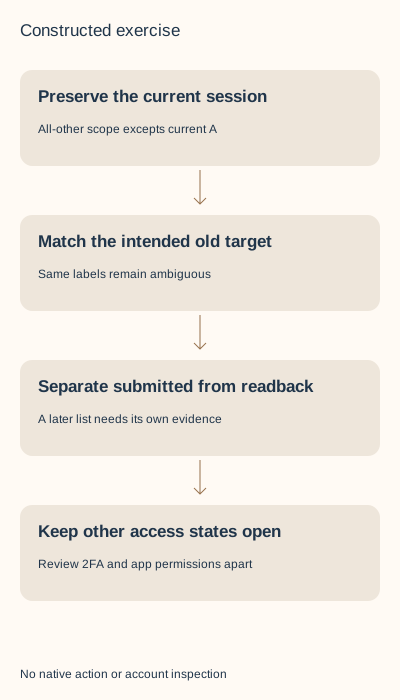
- Match the intended session rather than choose the first familiar browser label.
- The all-other-sessions action expressly excludes your current session.
- Keep session readback, two-factor setup, app access and retained copies separate.
Define the old-session job while keeping working access
You have finished using an old publishing device and want to stop that particular signed-in session. Begin with the actual member account and a clear reason for the change. A Page is administered through authorized member identities; it is not another shared password to distribute. Keep your current authorized access and any necessary recovery route available while reviewing the intended old session.
This task is narrower than changing an authenticator installation, replacing an email, revoking a service or closing the account. Those guides complete different jobs. It does not require an inbox export, recipient list, new account, test sign-in or a blanket logout merely to make a checklist look finished. If access is already lost or the account is restricted, use the appropriate official recovery path rather than assume a session-list operation is available.
Read the actual session list and match the intended target
LinkedIn’s current help describes active-session information including location, IP address, device type, browser and last sign-in. On desktop it opens Me, Settings & Privacy, Sign in & security and Where you’re signed in. On mobile it opens profile picture, Settings, Sign in & security and the session page. The German task calls it Aktive Sitzungen. Inspect the actual offered surface rather than expect every app to show identical labels.
Use the information together with your existing device/work context. Two sessions can have the same browser label. That label, a familiar place or a position in a list alone does not identify the intended human or old device. Keep an uncertain match unresolved. A private minimal reference and the intended action are more useful than publishing an entire list containing IPs and locations.
Our fictional inventory has current session A and two other sessions, B and C, both labeled Desktop browser. The exact-reference example identifies B from its supplied work context; the label-only example cannot distinguish B from C. These labels and opaque references are teaching inputs, not a screenshot, native session identifier or a replication of LinkedIn’s matching logic.
Choose individual sign-out or all other sessions deliberately
The desktop task ends an individual session through Sign out beside that session, then its password/End session confirmation. Mobile uses END and its own confirmation. Enter any actual password only in the official account context; the worksheet has no password or code field. Select the exact intended target before confirming a real action.
The separate bulk action signs out the other sessions except the one currently in use. Its scope is not all devices including this one, and it is not the same as ending one selected old session. Read the actual confirmation and decide whether that broader operation is wanted. Our exercise performs neither operation.
The help also describes all-session sign-out in troubleshooting access or timezone problems. Do not turn that paragraph into a routine evidence test that discards working access. For an unrecognized login/device the help recommends changing the password through the official route. An unfamiliar entry has an unknown actor in our supplied case; it does not authorize a fabricated attacker attribution or a claim that one click completed recovery.
| Question | Relevant evidence | Keep separate |
|---|---|---|
| Is B the intended old session? | Actual matching account/session context | A repeated browser label |
| Was the request submitted? | Actual confirmation/request state | Later list readback |
| What does all other sessions include? | The documented scope except current | A goal to end the current one too |
| Is an unknown login resolved? | Official response and appropriate access checks | An assumed actor or universal security guarantee |
Read the exact result without assigning another control’s outcome
After an intentional authorized operation, revisit the appropriate session list and inspect the intended target with its time and account. A closed dialog is not that observation. If the result is unavailable or uncertain, keep it unknown before any repeat. The source says signed-out sessions are no longer active and drop from the list, but a missing later row does not identify who caused the change or prove that every other access route closed.
Two-factor setup concerns a method/device verification. A service removal concerns that application’s access; the service may retain data received earlier. Neither observation can stand in for the particular later member-session list. Ending a session also does not prove vendor billing stopped, a queued publication was cancelled or an already downloaded document was erased.
The session page’s side note routes connected applications through Partners & services. The current application-specific help instead describes Data privacy, Other applications and Permitted Services for removal. Keep those task surfaces and their scopes explicit instead of inventing one universal menu or treating an application row as a member-session row. Use the existing connected-service exit guide when that is the actual job.
Resolve eight complete constructed session decisions
S1 identifies current A and intended old B, with an individual-end plan and no action/readback. Keep plan only. S2 searches the repeated Desktop browser label and finds B and C; hold the ambiguous target. S3 supplies a submitted request for B with no later list; submitted is still not an inspected outcome. No account action was performed for any case.
S4 supplies a later list containing A and C but not B. Preserve that specific observation and the still-current A, while actor, other access and app permissions remain unknown. S5 expects the all-other action to end A too and is held for a scope mismatch. A missing target in a supplied list is not a measured compromise-recovery result.
S6 supplies an enabled two-factor state and claims all sessions ended; S7 supplies app access removed and claims member session B ended. Both keep the controls apart and leave session readback unverified. S8 declares a login/device unrecognized with unknown actor. Record the help’s official password branch without an invented diagnosis, support request or successful recovery.
Rebuild the records and keep a minimal private receipt
The packet supplies eight actual authored session rows alongside seven separate two-factor/device rows, source and observation declarations, complete English/German decisions, four localized technical diagrams and private blank records. Two actual minimal-status text files demonstrate a bounded export from nonfunctional fictional placeholders. They are not account screenshots, credentials or a general redaction service.
With an existing Python 3, extract the ZIP and run python3 check.py. Its standard-library rebuild verifies exact teaching inputs and reproduces every result/file, without network or account operations. Duplicate cases, wrong account/product, wrong readback identities, invalid timestamps and unsupported outcome substitutions are rejected. This validates the closed exercise schema rather than arbitrary real session lists.
For real work, keep purpose, authorized account, intended session/context, individual or all-other scope, offered control, separately submitted state, actual later list and open access questions privately. The public sources were reviewed in both languages on 2 November 2026; receipts use UTC. No private session, account, device, password, two-factor setting, application permission or support route was accessed or changed. Reader preference, native UI/download/device proof and customer value remain unmeasured.
Sources & product references
Product details reflect the publication date. External features and interfaces may change.
- LinkedIn: Individual and all-other sign-in sessions (en)
- LinkedIn: Individual and all-other sign-in sessions (de)
- LinkedIn: Separate two-factor setup and product dependency (en)
- LinkedIn: Separate two-factor setup and product dependency (de)
- LinkedIn: Separate third-party permissions and retained copies (en)
- LinkedIn: Separate third-party permissions and retained copies (de)
- Original constructed session/device records, complete bilingual decisions and standard-library rebuild


