
The short answer
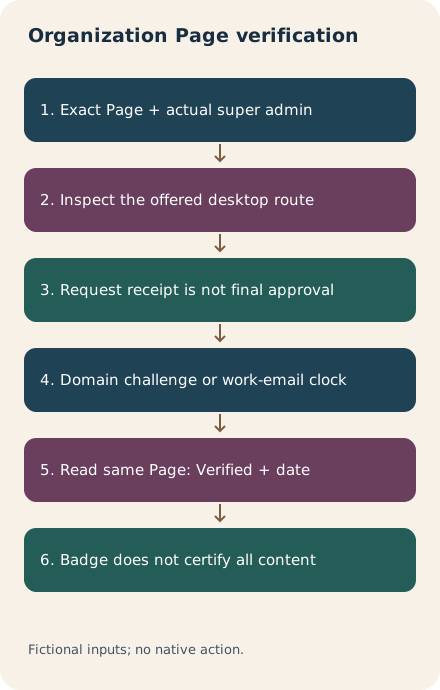
Start in the intended organization Page’s desktop super-admin view and inspect Settings, Verification controls. Follow the route actually offered: a request and domain-completion flow or, for some admins, workplace email verification. Keep legal organization, domain, complete challenge and each stage’s clock distinct. A received request, published TXT record or confirmed work email is not by itself final Page approval. Check that the same Page shows Verified and its verification date.
What you’ll take away
- Eligibility and a support request do not guarantee a badge.
- The domain challenge and a work-email code have different clocks and completion steps.
- A Page badge identifies an official organization; it does not certify every claim it publishes.
Match the organization, Page and actual super-admin access
Record the exact Page, organization and website privately before beginning. Page creation, a member’s identity badge and Page verification are different tasks. A badge on someone’s personal profile does not establish the organization Page’s current status. Use the intended Page’s super-admin view on desktop; content access or a familiar company name is insufficient to choose a target.
The Page overview says the badge signals that LinkedIn has confirmed the Page represents the official organization. It does not guarantee the accuracy of every post or imply endorsement of the organization or its activities. Absence of a badge is not proof of fraud. Keep the factual checks for an offer, employer or client work separate from the badge workflow.
Inspect availability without treating payment as approval
Open Settings, then Verification controls. The current tasks say an absent option means verification may not be available for that Page. If the controls are present but the Page is not eligible, Ask about verifying can express interest. A waitlist entry is not an approved request. Eligibility can involve meaningful engagement, an established commercial relationship, accurate Page data, active admins, a claimed Page and compliance; meeting criteria still does not guarantee verification.
The overview says paid Premium Company Page, Jobs or Ads makes a Page automatically eligible under its general flow, while new free/trial Premium requests are excluded. It also says historically verified free/trial Pages can retain their badge. A separate task conditionally offers some super admins a workplace-email route. These are differently scoped instructions: neither “all Pages can use email” nor “buying something guarantees a badge” follows. Inspect the actual available route; no purchase or trial is needed for this guide.
Keep the initial request and the domain completion separate
The general request task uses Verify workplace, then a Verify your Page dialog, Get started, legal business name and website URL, business address, review and Submit. Check those actual fields and the organization they describe. A received-request message and Pending status record submission, not the final badge. A successful initial request can prompt a separate Complete verification step in the admin view.
The same Verify workplace label appears in the dedicated work-email task, which asks for an email address instead. Let the actual dialog identify the route; do not supply an email code to a domain workflow or treat a business-details receipt as completion of email verification. If the offered state is unclear, retain it as unresolved instead of replaying a request speculatively.
For a domain challenge, retain the full issued value and owner
When Complete verification is offered, the dedicated task asks you to select your domain provider and create a new DNS TXT record. Copy the entire issued code, including linkedin-site-verification=, at the domain specified by the actual challenge. Confirm the intended domain and authorized DNS operator before a change. Our planning record also preserves unrelated existing TXT values; it is not permission to overwrite a different record or a universal DNS-provider recipe.
The task says provider DNS updates usually occur within 24 hours and the code must be published within five days of the request. Keep the actual challenge/request time, publication observation and full value together. These are not a five-day email-code lifetime or proof that a record became publicly available. If the relevant clock or current challenge is unknown, inspect the current offered request before proceeding. The exact boundary was not tested here.
After the new TXT record is created, the task says Continue, review the TXT record and Submit request. An error, absent record or uncertain prior submission needs the task’s diagnosis or the authorized technical team. The help describes restarting for its unknown-error condition; that does not justify repeating an uncertain completed request before checking the current state. No DNS query, record change or private domain challenge was performed for this guide.
For an offered email route, use its own clock and approval condition
The dedicated workplace-email task says a super admin may see this option on desktop. It requires a current company email matching the company domain, then a numerical code and Confirm. The stated code expiry is 15 minutes after receipt, not after an assumed send time. Do not put a real code, mailbox contents or credentials in a shared worksheet. Our fixtures retain only nonfunctional status and clock declarations.
That task first describes a badge after verification, but its final paragraph explicitly adds third-party Page review and “if approved.” Keep work-email confirmation and final Page approval separate. The task also describes a personal-profile badge where applicable; verify that object separately. Its statement that other members do not see the supplied email is not a promise that every provider or distributed copy lacks that information.
Read the final Page status and resolve a failed request deliberately
The request task mentions up to 48 hours depending on the domain provider; the domain task mentions usual 24-hour DNS updating and the overview/completion tasks allow up to ten days for high-volume processing. They describe different stages. None turns elapsed time into an observed approval or failure. In Verification controls, a verified Page shows Verified and a verification date. Match that readback to the intended Page and keep Pending, failed and unknown distinct.
A failed attempt can provide a support route from Verification controls. A support submission does not guarantee verification. Retain the actual response and follow requested next steps rather than assuming a support case is a badge. LinkedIn can revoke a badge for misuse or risk. Verification and later addition of email domains for member association are separate actions; the badge alone does not prove that every employee has verified their workplace.
| Supplied observation | Bounded conclusion | Still unproven |
|---|---|---|
| Request received; Pending | The request was received in this supplied case | Final Page approval |
| Matching TXT value at the intended owner | A matching supplied record observation | LinkedIn acceptance or a badge |
| Work email confirmed; Page still Pending | Email confirmation, with Page review unresolved | Final organization verification |
| Same Page: Verified and a date | A matching supplied final-status readback | Accuracy of all Page content or endorsement |
Use twelve route, identity and clock cases before calling it verified
Our fictional cases separate a received request, no offered route, another Page’s readback, a missing challenge prefix, a wrong DNS owner, a six-day publication delay, the untested exact five-day boundary, a 16-minute email-code age, the untested exact 15-minute boundary, confirmed email with Page review pending, a matching final-status readback and an unknown challenge clock. The example domain ends in .invalid and its challenge is explicitly nonfunctional. No mailbox, account, DNS provider or LinkedIn backend is contacted by the checker.
Download the complete package or the private blank below. Extract using existing Python 3 and run python3 check.py to reproduce the decisions, localized records and diagrams. The offline checks enforce only the supplied facts, exact references, independent observations and declared planning boundaries. They are not a DNS validator, live eligibility test or measured customer outcome. Both official language editions were read on 2 November 2026; no Page, domain, email, code, subscription or support request was changed.
Sources & product references
Product details reflect the publication date. External features and interfaces may change.
- LinkedIn: Page eligibility, domain challenge and conditional work-email review (a6825543, en)
- LinkedIn: Page eligibility, domain challenge and conditional work-email review (a6825543, de)
- LinkedIn: Page eligibility, domain challenge and conditional work-email review (a7174627, en)
- LinkedIn: Page eligibility, domain challenge and conditional work-email review (a7174627, de)
- LinkedIn: Page eligibility, domain challenge and conditional work-email review (a8394087, en)
- LinkedIn: Page eligibility, domain challenge and conditional work-email review (a8394087, de)
- LinkedIn: Page eligibility, domain challenge and conditional work-email review (a10904041, en)
- LinkedIn: Page eligibility, domain challenge and conditional work-email review (a10904041, de)
- Original constructed education, Page and broadcast records


