
The short answer
For an ordinary member message, LinkedIn documents text editing or individual-message deletion within 60 minutes of sending. Identify the exact item and inspect its actual menu before a deliberate correction. An edit needs a saved-text check; deleting a whole conversation removes it from your inbox and is a different action. The separate member InMail exception matters. None of these controls proves that earlier words were unseen, notifications withdrawn or external copies erased.
What you’ll take away
- Match the intended message, product and action before using a time rule.
- Keep a proposed correction separate from the text actually saved.
- Individual-message deletion and removing your conversation have different documented scopes.
Identify the particular sent item and the correction you need
Begin with the existing work context: the intended conversation, your particular sent item and the error that needs correcting. A similar name, repeated sentence or newest message is not enough to select the right object. Use a minimal private reference and the relevant sentence rather than exporting an inbox. If the existing thread itself is uncertain, use the retrieval guide first.
Write the intended replacement before touching a control. In our fictional example, “The review is Tuesday” needs “The review is Thursday”; the change concerns a date, not a new promise that someone approved the review. Preserve the speaker, task and qualification. A correction should repair the mistaken meaning without silently turning a proposal into an agreement. This guide concerns member Messaging, not Page, Recruiter or Sales Navigator controls.
Review the time, message type and actual offered control
The individual-message help limits its ordinary-message guidance to text editing or deletion within 60 minutes. On desktop it directs you to the particular message’s More menu; mobile uses a press and hold on that message. Edit is followed by Save, while Delete has a confirmation. Inspect the actual item and offered operation. A missing control is not permission to choose a different object.
Keep a trustworthy sent timestamp and the later review timestamp together, with their timezones. Twenty minutes and 75 minutes describe different positions relative to the help. A missing sent time leaves elapsed time unknown. Our exercise deliberately holds the exact 60-minute boundary because the source does not establish a tested second-by-second cutoff. Its clock arithmetic does not make a native menu appear.
The same help explicitly excludes deleting a sent member InMail. For editing InMail, it uses the condition before acceptance OR within 60 minutes. Keep those alternatives: not accepted at 90 minutes and accepted at 20 minutes each satisfy a different stated branch in our supplied records. That source interpretation is not an observed account entitlement or an instruction to test another recipient.
Separate the corrected item, conversation removal and recall
LinkedIn says an edited item carries an Edited label. For a deleted individual message, it describes removal for all participants, a deletion note and no retrieval of that item. The whole-conversation help instead describes removal from your own inbox, not the recipient’s, with no restoration or access to that deleted conversation. Choose the object deliberately; a thread-level menu cannot stand in for a particular-message correction.
The separate recall page says a sent message cannot be recalled and links these narrower tasks. Its German opening currently mistranslates recall as remembering. The English body, German heading and linked editing/deletion instructions support the control distinction; the bad opening is not a rule about memory. We retain the discrepancy rather than promising a universal unsend feature.
A visible saved edit or deletion note is evidence about that supplied state. It cannot establish what someone read earlier, understood, copied or saw in a notification. If another clarification is needed in an existing authorized work exchange, it is a separate communication decision. Neither an unknown outcome nor a correction draft justifies an automatic repeat message.
Resolve ten complete constructed records
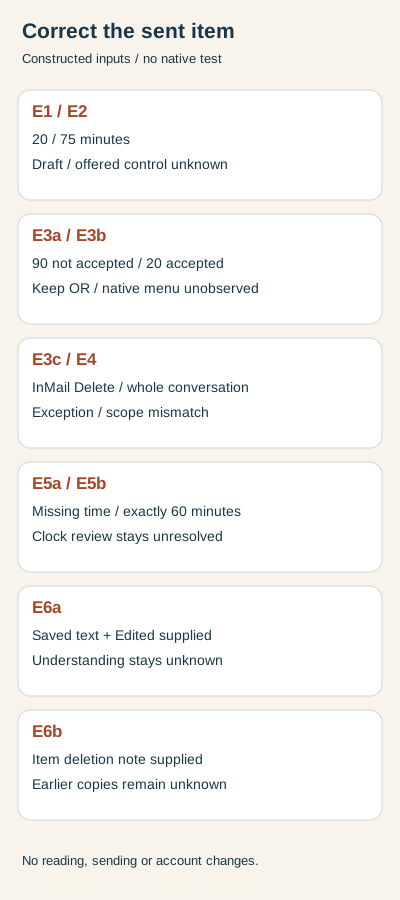
E1 supplies ordinary text reviewed 20 minutes after sending. A replacement and an offered Edit control are supplied, but no saved result is observed. Keep the draft and hold the completion claim. E2 supplies ordinary text at 75 minutes with no control observation. It lies outside the documented window; the offered native action remains unknown. Deleting the whole thread would not solve that missing observation.
E3a supplies member InMail not accepted at 90 minutes; E3b supplies accepted InMail at 20 minutes. Each keeps the source’s OR condition through a different branch, while an actual Edit offering and saved outcome remain unobserved. E3c proposes Delete for sent InMail and is held under the explicit exception. Do not import another product’s controls or infer a send from any of these records.
E4 chooses a whole-conversation Delete but expects removal for every participant. Hold that object/scope mismatch. E5a lacks a sent timestamp; E5b is exactly 60 minutes old. Hold clock-based eligibility in both for different reasons: missing timing versus an untested boundary. Do not replace either with a convenient timestamp.
E6a supplies an Edited marker and the saved Thursday wording for the intended item. The record supports that declared edit result, while recipient understanding stays unknown. E6b supplies the intended item’s deletion note. Retain that declared item state while earlier reading, notifications and external copies remain unknown. These are fictional observations supplied to a local exercise, not observations from LinkedIn.
Rebuild the decisions and use a blank private correction record
The packet contains ten actual CSV input rows, calculated elapsed times, object/scope decisions, complete English/German explanations and blank working records. With Python 3 already available, extract the ZIP and run python3 check.py. The standard-library rebuild reproduces the results and localized diagrams. It makes no network request and performs no message or account action.
The checker rejects duplicate case IDs, a mismatched item reference, a claimed saved edit without a supplied saved-text result, an InMail deletion relabeled allowed and unsupported claims that recipients did not read the old text. Naive or reversed timestamps are rejected. These checks help expose a faulty record; they do not decide whether a real relationship needs another message or establish a native account capability.
Verify the authorized result and keep unresolved consequences open
For real work, keep purpose, exact item, product/type, reliable timestamps, proposed text, actually offered control and separately observed result in the private worksheet. After an intentional authorized edit, inspect the exact saved wording and item. After an authorized deletion, inspect the appropriate item state rather than a vanished composer. If that readback is unavailable, keep the outcome unknown before any retry.
Public help was reviewed in both languages on 2 November 2026 in Europe/Berlin; receipts retain UTC. No private conversation was opened, message sent, edited or deleted, and no recipient was collected. This source review and constructed exercise establish neither native UI/download proof nor recipient behavior, reader preference or customer value.
Sources & product references
Product details reflect the publication date. External features and interfaces may change.
- LinkedIn: Editing and deleting an individual sent message (en)
- LinkedIn: Einzelne gesendete Nachricht bearbeiten oder löschen (de)
- LinkedIn: Deleting a whole conversation (en)
- LinkedIn: Gesamte Unterhaltung löschen (de)
- LinkedIn: Recall wording and linked correction tasks (en)
- LinkedIn: Rückrufbegriff und verknüpfte Korrekturaufgaben (de)
- LinkedIn: Bulk conversation actions and deletion limits (en)
- LinkedIn: Sammelaktionen und Löschungsgrenzen (de)
- Original constructed correction records, complete bilingual decisions and local checker


