
The short answer
Start with the existing conversation you actually need, then review the search words, intended participant and current inbox category or filter. Look in Archived when appropriate and inspect the intended thread before deciding whether to restore it. An empty filtered result does not establish deletion. LinkedIn documents restoration for archived conversations and a different boundary for deleted messages; sending another message is a separate action.
What you’ll take away
- Keep the search context with the result; an unread filter can hide a read conversation.
- A keyword or matching name is a candidate, not a confirmed intended thread.
- Viewing an archive, planning Restore and observing a restored thread are separate states.
Identify the existing thread and the reason to retrieve it
Use a specific existing work question, such as finding the wording of an agreed handoff. Record a minimal private reference: the relevant participant context, approximate period and a useful phrase. A common name or a search rank alone does not identify the intended conversation. Keep unrelated personal messages outside the task and avoid copying an entire inbox into a public exercise.
This guide concerns ordinary member Messaging. Page inboxes, Sales Navigator and Recruiter have their own access, categories and recovery rules. The related guides cover presence signals, contact boundaries and the route for a new intended communication. This task completes retrieval of an existing thread; it needs no new contact, trial, subscription or test message.
Keep the category and filter beside the search result
LinkedIn’s current search help supports keywords or recipients and describes Focused, Other, Archived and Spam categories. Its full messaging page and compact conversation window use different category/filter routes. Mobile guidance also lists Drafts. Read the actual surface and selected state rather than treating every client as an identical dropdown.
Review an active Unread, My Connections, Starred, Jobs or InMail filter when the result seems incomplete. Clear or change only the intended context and repeat an appropriate search. A missing result under Unread cannot establish that a previously read thread is gone. InMail as a filter label does not establish a credit-bearing route or the capacity to send another message.
The local exercise declares its own collection and filter model explicitly. It is not a replica of LinkedIn’s search index, ranking, keyword matching or combinations of native filters. For a real search, record what the platform actually offers and what you actually tried; leave an unsupported combination or an uncertain result unresolved.
Read the archived state before deciding on restoration
The archive help routes through Messaging, the inbox category and Archived; the compact window uses its filter control. Open the intended conversation to view it. The documented restoration control is in the conversation’s More menu, with Restore or Unarchive wording depending on the surface. Inspect the participant and relevant existing message before a deliberate restoration decision.
The bulk-action help separately says deleted messages cannot be restored or accessed. An empty search is not evidence that deletion occurred, and an archive action is not a deletion test. Review selected conversations and the exact action before any intentional bulk change. This article performs no archive, restore, read-status change or deletion.
LinkedIn also describes Sponsored Messaging ads being automatically archived between 20 and 40 days after receipt. That statement concerns those ads. It does not establish a general deletion clock for personal conversations or prove that another member chose to ignore, archive or reject your message.
Work through the five supplied retrieval situations
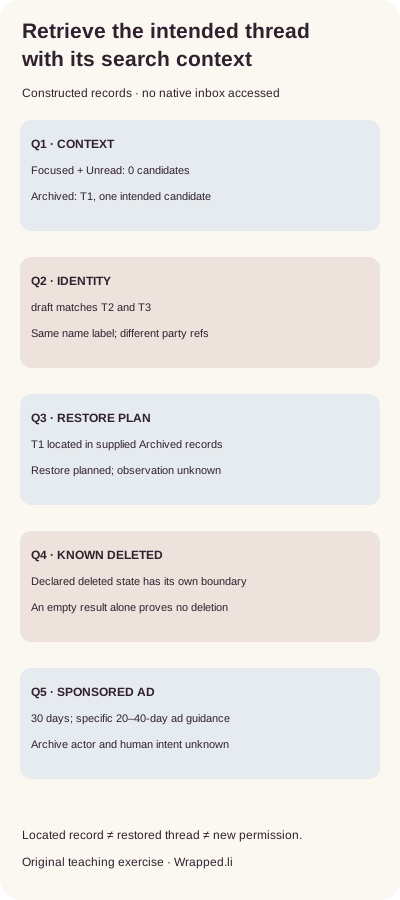
Q1 — The supplied intended thread T1 is read and archived, but the first search uses a Focused/Unread context. That local query returns no candidates. Reviewing the declared Archived context locates T1. Decision: retain the two search contexts; the first empty result does not prove loss. No native inbox was searched for this exercise.
Q2 — The word draft matches two fictional threads with the same displayed person-name label but different party references. Decision: hold the ambiguous match until existing work context identifies the intended thread. Do not choose the first result or send a new message to determine which person it is.
Q3 — The supplied Archived search identifies T1 and the owner’s desired next step is Restore, but no restoration observation is supplied. Decision: record the candidate and the plan while leaving the actual restoration unobserved. A plan or a local calculation cannot establish that a thread moved in LinkedIn.
Q4 — A separate supplied record is explicitly known deleted. Decision: preserve that declared state and the documented recovery boundary; do not offer Archived as a recovery path for it. Q5 is a Sponsored Messaging ad archived at a declared age of 30 days with an unknown actor. The specific automatic-archive guidance is relevant, but neither the age nor the folder establishes a human response or the cause of this particular supplied record.
All T/Q records are constructed. The checker searches only supplied local records, makes no network request and performs no message or account action.
Use the actual inputs without turning the model into native proof
The download includes five declared conversation records, five case inputs, query contexts, computed decisions, complete English/German records and a blank private worksheet. With Python 3 already available, extract the ZIP and run python3 check.py. The supplied result changes from zero candidates in the restricted context to one intended candidate in Archived; the ambiguous keyword case has two candidates.
The checker rejects duplicate conversation or case identifiers, a wrong party selected for an exact-reference task and an unsupported claim that an unobserved restoration succeeded. These checks validate the supplied exercise. They do not recover deleted messages, certify a platform search result, assess the meaning of a real conversation or establish reader/customer value.
Close with the existing reference and the remaining uncertainty
For actual work, record the purpose, intended-thread context, category/filter, search phrase or recipient, observed candidate identity, relevant existing wording and any separate restoration decision. Keep sensitive content private and collect the minimum needed for that purpose. Preserve an unknown action outcome before considering any repeat; a retrieved conversation is not permission to contact someone again or publish their words.
Read a deliberately changed state back on the appropriate native surface if you performed an authorized operation. This guide’s public source review is dated 2 November 2026 in Europe/Berlin, with UTC receipts. No private conversation was opened, person contacted, account modified or product feature tested. The supplied records teach the documented reasoning; they do not verify a native interface, an actual download or a real account state.
Sources & product references
Product details reflect the publication date. External features and interfaces may change.
- LinkedIn: message search, categories and filters (English)
- LinkedIn: message search, categories and filters (Deutsch)
- LinkedIn: viewing and restoring archived conversations (English)
- LinkedIn: viewing and restoring archived conversations (Deutsch)
- LinkedIn: archiving existing conversations (English)
- LinkedIn: archiving existing conversations (Deutsch)
- LinkedIn: bulk actions and the deleted-message boundary (English)
- LinkedIn: bulk actions and the deleted-message boundary (Deutsch)
- Original constructed retrieval inputs, complete bilingual decisions and private working records


