
The short answer
For an already intended member-message handoff, open the reviewed file, identify the exact conversation and use the current format list for your platform. The member help lists different document formats for desktop, iOS and Android. Its desktop and iOS steps say up to 20 MB; the Android sequence does not repeat that size statement. Inspect the actual offered control and attachment before a deliberate Send. An upload, a sent item and recipient understanding need separate evidence, and notification email may include the file.
What you’ll take away
- A familiar filename does not identify the reviewed document contents.
- Member Messaging and Sales Navigator have separate attachment instructions.
- An attached or uploaded file is not an observed send or a private-copy guarantee.
Start with the existing handoff and the actual document
A collaborator has already asked for your reviewed summary. The useful job is to hand over that exact artifact in the intended existing exchange. Establish the purpose and appropriate recipient context before opening any control. A name match, available compose button or local file does not establish that a new contact is wanted. This guide needs no recipient list, test message, subscription or private inbox export.
Identify the reviewed version by its contents and source, not merely handoff-final.docx. Open the document and check its actual numbers, dates, links and disclosure. A draft can have the same filename as the approved version. Keep a minimal private reference for the intended conversation and approved file; avoid uploading personal documents to an unrelated comparison service.
Read the format list for the actual product and platform
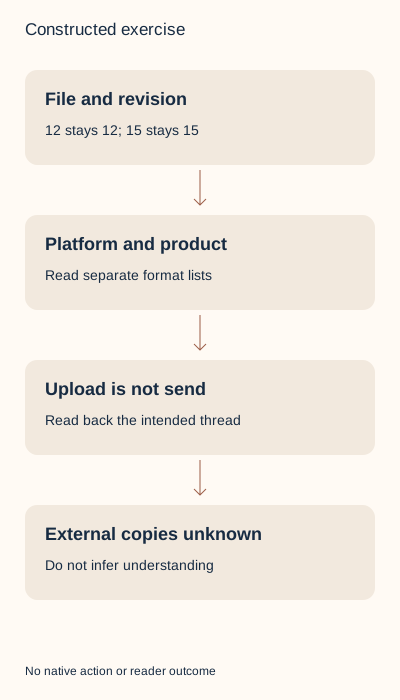
The member Messaging help lists desktop documents XLS, XLSX, DOC, DOCX, PPT, PPTX and PDF. iOS adds TXT to that document set. Android lists PDF, DOC and PPTX. All three list GIF, JPEG, JPG, PNG and BMP images and MP4/MOV video. A format appearing in the iOS row does not establish its desktop or Android availability. Missing from a list is a reason to hold the documented plan, not proof of an observed native rejection.
The desktop and iOS selection steps specify up to 20 MB. Android’s steps do not repeat that statement; their omission proves neither unlimited size nor a different numeric allowance. The help does not establish an exact decimal-versus-binary byte cutoff or a tested boundary. Our tiny files sit well below either interpretation, and the exercise makes no native size test.
Sales Navigator has a separate page with 50 MB per attachment, its own format list and product-specific upload/scan and indicator wording. Those details do not enlarge member Messaging limits or establish member InMail read receipts. Its German format token DOK differs from the English DOC; neither supplies a new member format. Use the current task for the product you actually have, without a purchase or product switch to force a handoff.
Review a real file before selecting it
Our two actual DOCX teaching packages have one declared original basename, handoff.docx, but different contents: r1 says 12 reviewed items and r2 says 15. Their public download names distinguish the fixtures; the source declaration preserves the same-name situation. The checker opens the package XML, reads the counts and verifies exact bytes. Both are fictional examples without real client data. A hash can identify bytes; it cannot decide whether the claim is true or appropriate.
For a real handoff, use the existing document application to review what the intended recipient will open. Keep the source and export aligned. Renaming a DOCX file to PDF changes neither its format nor its internal content. If a different supported export is needed, create it with an appropriate existing tool and inspect the new artifact separately. Our exercise supplies no converted PDF or Office rendering proof.
A plain TXT teaching note also contains 15 reviewed items. Its presence illustrates the iOS document listing while the desktop listing omits TXT. Changing the platform label in a record does not turn a desktop composer into an iOS client. Preserve the actual platform, format and file, and leave an unavailable route unresolved.
Separate selection, upload and the intended send
The documented desktop route opens Messaging and Compose, selects the intended recipient and uses Attach; drag and drop is also described. On iOS the task uses Attach and Send a document; Android uses Add and Send a document. Each has a later Send action. In an existing exchange, verify the exact thread and offered controls rather than create an unnecessary new conversation to follow a generic compose example.
Before an authorized Send, inspect the intended conversation, attachment name and reviewed contents together. An upload indication or attachment in the composer supports preparation only. After an intentional send, inspect the actual intended item and attachment when permitted. Preserve an uncertain result before any retry; sending again is another communication, not a way to prove the first attempt succeeded.
The member help says notification email can include attached files, depending on the recipient’s settings. Do not promise that a message attachment stays inside the conversation or disappears from every copy after another change. The text-edit task explicitly concerns text editing; it does not establish attachment replacement or recall. Even a supplied sent state cannot establish opening, understanding, agreement or erased email copies.
Work through ten complete constructed file decisions
F1 selects the reviewed r2 DOCX on desktop: the plan matches the documented format, but upload and send are unobserved. F2 selects the same-basename r1 with 12 instead of 15 items: hold the wrong revision. F3 proposes DOCX on Android: hold the documented-format plan without calling it an observed platform rejection. F4 uses the actual TXT on iOS, while F5 holds that TXT plan on desktop.
F6 supplies a sent observation for T2 while the intended exchange is T1. The right file in the wrong declared thread cannot complete the intended handoff. F7 supplies the exact file uploaded in T1, with no sent state. F8 supplies the same exact file as sent in T1. Retain those different fictional observations; neither demonstrates a real recipient or understanding.
F9 claims no email copies and is held against the documented possibility. F10 imports the Sales Navigator 50-MB policy into member Messaging and is held as a product mismatch. The packet’s actual source files are small; this row tests a borrowed policy, not a fabricated 50-MB upload. Complete localized explanations and the actual CSV inputs preserve every decision.
Keep a usable record and inspect the result honestly
The local packet contains the actual DOCX versions, TXT note, separate source and observation declarations, ten file rows alongside twelve event rows, complete bilingual decisions, diagrams and a private blank record. Extract the ZIP and run python3 check.py with an existing Python 3. The standard-library rebuild makes no network request or account action. It rejects changed source bytes, duplicate cases and unsupported outcome substitutions; it is not a virus scanner or a native client replica.
Keep the real purpose, exact file identity, product/platform, intended thread, offered control, deliberate action and separately observed outcome in the private record. Do not copy a sent state from another conversation or infer that a final filename proves approval. Use the document-retirement guide for the separate job of replacing controlled old copies.
Primary English and German help was read on 2 November 2026; receipts use UTC. No private conversation, recipient, account, attachment upload or send was accessed or performed. These constructed files teach bounded handoff decisions and do not establish native UI/download proof, independent review, reader preference or customer value.
Sources & product references
Product details reflect the publication date. External features and interfaces may change.
- LinkedIn: Member attachment formats, platform routes and email copies (en)
- LinkedIn: Member attachment formats, platform routes and email copies (de)
- LinkedIn: Separate Sales Navigator attachment rules (en)
- LinkedIn: Separate Sales Navigator attachment rules (de)
- LinkedIn: Text-only editing scope and sent-message limits (en)
- LinkedIn: Text-only editing scope and sent-message limits (de)
- Original constructed inputs, exact files, complete bilingual decisions and local checker


