
The short answer
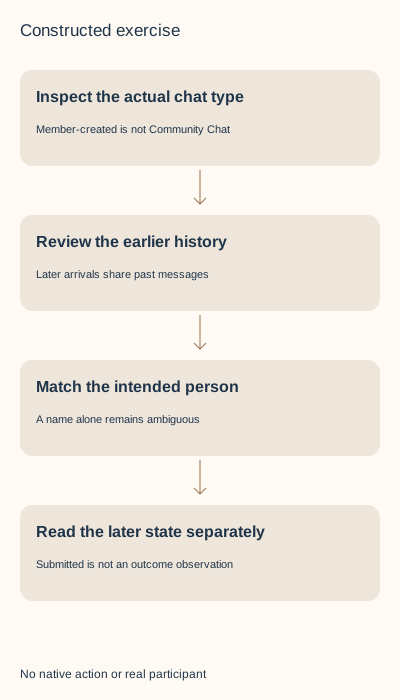
Identify the existing conversation and whether it is member-created or a LinkedIn-managed Community Chat. In a member-created group chat, the current help allows participants to add or remove others and says later joiners see the same past history. Review that disclosure before an intentional change, then inspect the actual intended participant and later state. Removal and leaving have documented notifications; leaving is described as permanent. Deleting your inbox conversation is a different scope and does not erase recipients’ copies.
What you’ll take away
- A later joiner can see the existing history, not only the next project message.
- Member-created chats, Community Chats and LinkedIn Groups have different controls.
- Submitted, separately observed membership and notification delivery remain different facts.
Start with the existing collaboration and actual chat type
A project collaborator needs to join an existing exchange, or an existing participant needs to leave it. Begin with the actual thread and that bounded work purpose. A familiar title or displayed name alone does not identify the intended conversation or person. Use a minimal private reference rather than copy the whole history or participant list into an unrelated tool. This task creates no new audience or recipient collection.
Ordinary member-created multi-person Messaging is different from a LinkedIn Group community with owners, managers and a post queue. It is also different from a Community Chat, an invite-only feature managed by LinkedIn. The dedicated participant task says people in Community Chats cannot add or remove others. First inspect the actual type; a common chat-shaped interface does not transfer rights between products.
Review the history that a later participant could receive
The creation and participant help say all participants share the same conversation history, including people who join later. Adding someone for the next project does not confine them to future messages. Review whether the earlier client, colleague or project material is appropriate for that new audience before choosing Add. Our planning hold for inappropriate history is a disclosure safeguard, not a native approval feature.
The member-created chat help says everyone is an admin and can add or remove members and edit the conversation name. It does not establish a permanent owner approval lock. A name change cannot restrict who has already seen earlier material. Neither removal nor departure demonstrates erased notifications, downloads or copied words.
The specific participant task says member-created chats can have up to 50 participants. Keep a current known count and the proposed distinct additions together. Forty-nine plus two exceeds that documented plan; an unknown count stays unknown. Our arithmetic is not a tested capacity boundary, a guaranteed menu or permission to collect real participants.
| Proposed goal | Review before acting | Still separate |
|---|---|---|
| Add only for the next task | Shared earlier history and intended person | A promise of future-only access |
| Remove one participant | Exact person, chat type and offered control | Notification actually received or old copies erased |
| Leave the chat | Permanent-departure guidance and actual confirmation | Deleting an inbox copy or later rejoining |
Match the exact person and read the result separately
On desktop the participant task opens the existing chat’s More menu, Add / Remove people and Conversation details. Addition selects the intended member from the dropdown, then Add and Done. Removal uses the menu beside that particular participant and a confirmation. Mobile uses its own Add people and Done sequence. Read the actual offered control rather than infer that another platform’s label is present.
The task also says mentioning a first-degree connection with @ inside a conversation can add that person. Do not treat such a mention as a harmless tag, a way to test identity or a research step. This guide sends nothing and performs no mention, addition or removal. A duplicate display-name match stays unresolved until existing context identifies the intended person.
After an intentional authorized change, inspect the particular conversation and its later participant state when permitted. Keep submitted and observed separate, with the same thread, person and time. LinkedIn documents notification when a participant is removed; that rule does not establish delivery for a particular person. An unknown result stays unknown before any repeat.
Separate leaving, inbox deletion and the Community exception
The current leaving help describes permanent removal from the thread: no new messages or notifications, no reply or rejoin, notification to all participants and a departure note. Read that consequence before a deliberate Leave conversation confirmation. A submitted Leave with no readback does not establish that it happened, and this article promises no reversal or invitation workaround.
The separate conversation-deletion task removes the conversation from your own inbox, not the recipient’s, and says deleted conversations cannot be restored or accessed. It also says the connection is not deleted or blocked. That is not evidence that you left a group chat or erased everyone’s history. Choose the object that matches the real purpose rather than use Delete as a test of another control.
The Community FAQ’s specific add/remove answer agrees with the dedicated task that members cannot add or remove others. A later safety answer loosely includes remove, creating a source inconsistency. We retain it and do not invent a Community removal button. The German FAQ route currently retains English substantive text, and availability is described as limited/testing. Its forwarding, blocking, waiting-room and assistant statements are not general rules for ordinary member-created chats.
Resolve nine complete constructed chat decisions
G1 proposes a later joiner for T1 while the declared history is inappropriate for that audience: hold the history disclosure. G2 has two same-name candidate references for one intended person: hold the ambiguous selection. G3 imports member-created Add rights into a Community Chat: hold the type mismatch. These are authored records, not actual people or conversations.
G4 supplies a submitted removal without a later list and claims silence. Reject that unsupported claim while preserving the unknown outcome. G5 supplies a later T2 list without the exact intended participant: retain only that fictional membership observation. It establishes neither the actor nor notification delivery, understanding or erased external copies.
G6 wants departure but chooses Delete conversation: hold the scope mismatch. G7 supplies Leave submitted with an unknown result and a promise of rejoining: preserve the uncertainty and reject the reversal promise. Do not repeat an uncertain action to make the record look complete.
G8 declares 49 current participants and two distinct proposed additions; G9 has an unknown current count. Hold the over-capacity documented plan and the missing-count case for different reasons. The supplied counts are teaching declarations, not a native participant collection or a platform load test.
Rebuild the local records and close the real task honestly
The download contains nine chat cases and seven separate LinkedIn Group participation cases: sixteen actual CSV inputs, independent source/observation declarations, complete English/German decisions, four localized diagrams and private blank records. Two actual text drafts have 12 and 15 reviewed sources; their separate retained review references expose stale approval in the Group exercise. They contain no real client text.
With an existing Python 3, extract the ZIP and run python3 check.py. The standard-library rebuild makes no network request or account change. It checks exact thread/person/type, chronology, ambiguous targets, unsupported notification/copy/rejoin claims and changed draft bytes. Those checks validate the teaching records, not a native client, real relationship or arbitrary private transcript.
For real authorized work, keep purpose, chat type, intended participant, earlier-history audience, offered operation, deliberate submission and later exact result in the private worksheet. Preserve unknown consequences. Primary bodies were checked in both languages on 2 November 2026; receipts use UTC. No private chat was opened, participant collected, person contacted or chat/account changed. No native UI/download, reader preference, customer value or independent review is established.
Sources & product references
Product details reflect the publication date. External features and interfaces may change.
- LinkedIn: Member-created chat and shared history (en)
- LinkedIn: Member-created chat and shared history (de)
- LinkedIn: Type-specific participant controls and removal notice (en)
- LinkedIn: Type-specific participant controls and removal notice (de)
- LinkedIn: Leaving and permanent departure (en)
- LinkedIn: Leaving and permanent departure (de)
- LinkedIn: Separate inbox deletion scope (en)
- LinkedIn: Separate inbox deletion scope (de)
- LinkedIn: Community Chat exceptions and current FAQ discrepancy (en)
- LinkedIn: Community Chat exceptions and current FAQ discrepancy (de)
- Original constructed chat/group records, complete bilingual decisions and local rebuild


